Data quality assessment
Data quality (DQ) assessment is a post-submission process that evaluates reported training activity data to identify unusual patterns, anomalies, and potential reporting issues that may require further review before a declaration can be submitted.
Unlike standard validation, which assesses whether individual records comply with defined business rules and field-level requirements, data quality assessment examines submitted data collectively across a reporting period. This allows the system to identify trends or patterns that may indicate potentially inaccurate, incomplete, or unusual reporting.
Examples include:
A high proportion of students are reported with missing Unique Student Identifiers (USIs) where a USI is required.
Many subject enrolments are reported with the same scheduled start or completion date, suggesting default dates may have been applied
An unusually high number of students are reported with more than 1,500 nominal hours of training in a single year
A large number of apprenticeships and traineeship enrolments are reported with missing or incomplete training contract information.
Data quality assessment supports confidence in the accuracy and completeness of submitted data and forms part of the declaration readiness process.
Page contents:
Where data quality checks fit into the STARS lifecycle
From a lifecycle perspective
Training activity data is submitted to STARS for a reporting period.
A data quality assessment is requested to evaluate the submitted data.
STARS assesses the data and returns data quality outcomes.
Assessment results are reviewed by the RTO and where required, data is corrected and resubmitted to STARS.
When assessment outcomes are satisfactory and declaration requirements have been met, the reporting period is declared.
Available API endpoints
1. Request a data quality assessment
POST /vet-provider/v1/reporting-period/{jurisdiction}/{ReportingPeriodNumber}/validate
2. Monitor assessment status
GET /vet-provider/v1/reporting-period/{jurisdiction}/{ReportingPeriodNumber}/validate
3. Cancel an existing data quality assessment request
DELETE /vet-provider/v1/reporting-period/{jurisdiction}/{ReportingPeriodNumber}/validate
4. Retrieve assessment ressults
GET /vet-provider/v1/reporting-period/{jurisdiction}/{ReportingPeriodNumber}/failed-validation-results
5. Submit declaration (existing declaration API)
POST /vet-provider/v1/reporting-period/{jurisdiction}/{ReportingPeriodNumber}/declaration
For complete endpoint definitions, request and response structures, status transitions, error handling and integration details, refer to the STARS API Specification.
What are data quality rules?
A data quality rule defines a measurable condition that is evaluated against submitted data.
Rules typically assess:
Statistical distributions.
Missing or incomplete information.
Reporting concentrations.
Outlier behaviours.
Population-based trends.
Each rule evaluates a population of records and determines whether pre-defined thresholds have been exceeded.
Depending on configuration, a rule may result in:
Warning
Error
Warnings and errors are collectively referred to as Assessment outcomes.
Example
A rule may assess the percentage of enrolments where Country of Birth is not supplied.
Heading
Result
Outcome
5% missing
No issue
20% missing
Warning
50% missing
Error
The outcome returned depends on the configured thresholds for the rule.
Data quality and reporting pathways and obligations
Several technical concepts are shared between data validation and data quality assessments. Detailed information on these concepts including reporting pathways, reporting obligations and jurisdictions can be found here
Data quality assessment process
Typical sequence
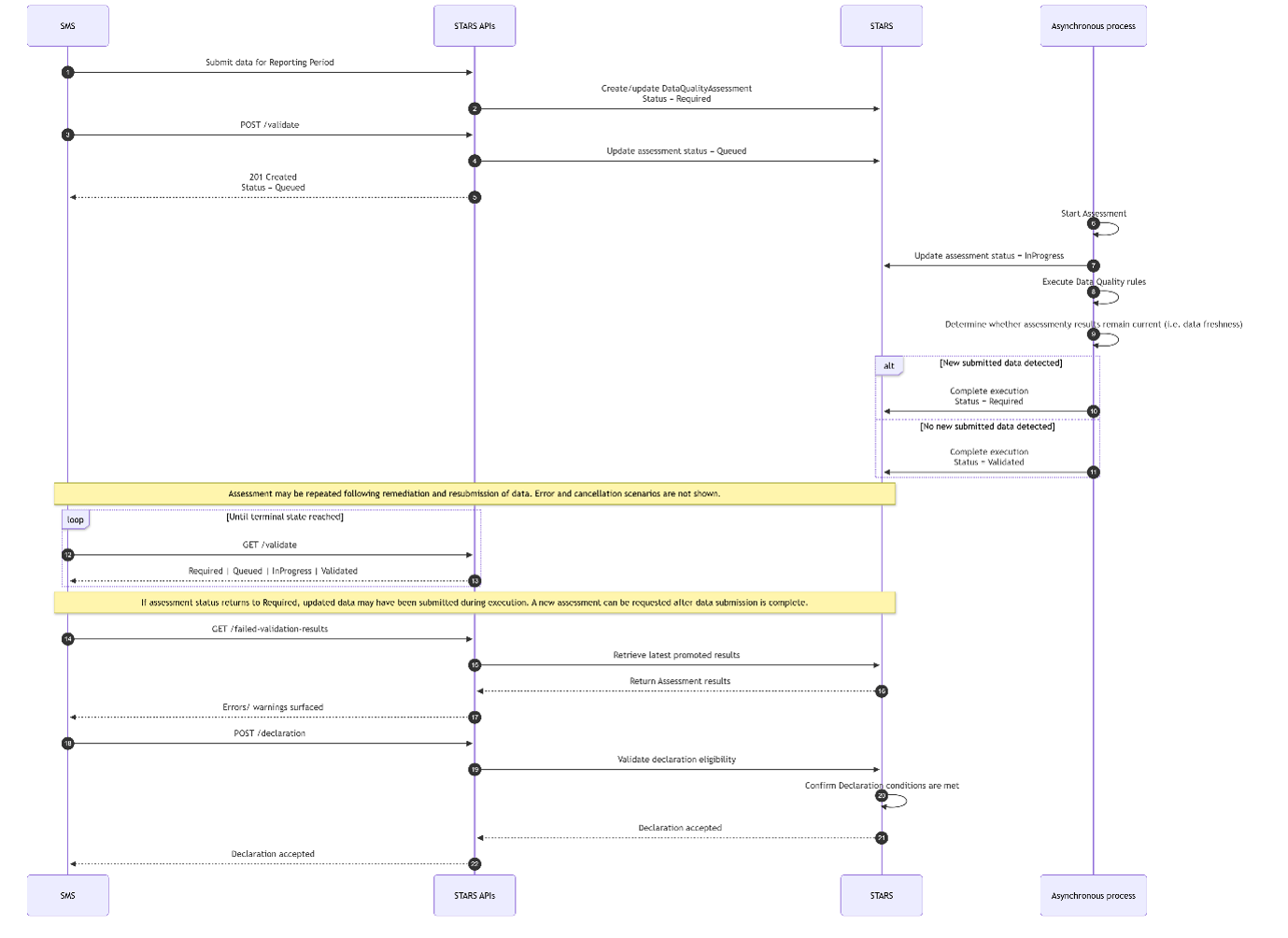
1. Submit data
a. The RTO submits the validated data for the reporting period.
b. Submission makes the data available for downstream processing, including data quality assessment.
c. A reporting period may receive multiple submissions over time.
Outcome: Submitted data is available for data quality assessment.
2. Request data quality assessment
a. The SMS requests that STARS perform a data quality assessment for the reporting period.
b. This is done using the data quality assessment API.
i. Endpoint: POST /vet-provider/v1/reporting-period/{jurisdiction}/{ReportingPeriodNumber}/validate
c. The request:
i. Creates or updates the data quality assessment.
ii. Places the assessment into the processing queue.
iii. Returns an initial status.
d. Because data quality assessment is asynchronous, the request only indicates acceptance of the assessment request and does not indicate completion.
i. Typical status returned = Queued
Outcome: Assessment request accepted and awaiting execution.
3. Monitor assessment status
a. The SMS periodically checks the status of the data quality assessment via the assessment status API.
i. Endpoint: GET /vet-provider/v1/reporting-period/{jurisdiction}/{ReportingPeriodNumber}/validate
b. During processing, the assessment may progress through the following states:
i. Required --> Queued--> In Progress--> Validated
c. The SMS should continue monitoring until the assessment reaches a terminal state.
d. Note, if additional data is submitted while a data quality assessment is In Progress, the assessment may become outdated. Upon completion, the assessment status might revert to Required, indicating that a new assessment is needed for the latest submitted data.
Outcome: Assessment completes successfully or fails.
4. Retrieve and review assessment results
a. Note, an additional summary results endpoint is under development, which will provide a more concise view of validation outcomes.
b. Once the assessment reaches Validated status, the SMS retrieves the assessment results.
i. Endpoint: GET /vet-provider/v1/reporting-period/{jurisdiction}/{ReportingPeriodNumber}/failed-validation-results
c. The results identify:
i. Errors (blocking outcomes).
ii. Warnings (non-blocking outcomes).
iii. Affected resources.
iv. Corrective guidance.
d. Users should review any returned outcomes to determine whether remediation is required.
Outcome: Users understand any identified data quality concerns.
5. Correct data (if required)
a. If the assessment identifies issues requiring remediation, the reporting organisation updates the underlying training activity data.
b. Examples may include:
i. Correcting reporting anomalies.
ii. Fixing missing information.
iii. Reviewing unexpectedly high or low reporting values.
iv. Investigating unusual reporting patterns.
c. Any data corrections must then pass standard validation and be submitted again.
d. If the RTO is unable to remediate issues, they should contact NCVER Support.
Outcome: Updated data submitted for reassessment.
6. Re-run assessment
a. Following submission of corrected data, a new data quality assessment should be requested.
b. This ensures:
i. Assessment results reflect the latest submitted data.
ii. Previous issues have been appropriately addressed.
iii. Declaration eligibility is determined using current information.
c. Multiple assessment cycles may occur before declaration.
Outcome: Current assessment results are available.
7. Confirm declaration readiness
a. Before declaration, the SMS should confirm that the reporting period satisfies declaration requirements.
b. This can be achieved by:
i. Checking assessment status
1. Endpoint: GET /vet-provider/v1/reporting-period/{jurisdiction}/{ReportingPeriodNumber}/validate
ii. Reviewing assessment results
1. Endpoint: GET /vet-provider/v1/reporting-period/{jurisdiction}/{ReportingPeriodNumber}/failed-validation-results
c. At a minimum:
i. Data quality assessment exists
ii. Assessment status = Validated
iii. No blocking validation failures exist
iv. Other declaration eligibility requirements are satisfied
Outcome: Reporting period is eligible for declaration.
8. Submit declaration
a. Once all declaration requirements have been satisfied, the SMS submits the declaration for the reporting period.
i. Endpoint: POST /declaration
b. The declaration process verifies:
i. Data quality assessment status.
ii. Presence of blocking outcomes.
iii. Other declaration requirements.
c. If all conditions are met, the declaration is accepted.
Outcome: Reporting period successfully declared.
Data quality assessment lifecycle
Data quality assessment statuses
Status
Meaning
Typical user action
Can declare?
Can request validation?
Can cancel validation?
Required
A current data quality assessment does not exist for the reporting period. This may occur because validation has not yet been requested, a previous assessment was invalidated by new submissions, or a previous assessment was cancelled or reset following a fault.
Request assessment
No
Yes
No
Queued
A data quality assessment has been requested and is awaiting asynchronous processing.
Wait for processing to commence
No
No*
Yes
In Progress
A data quality assessment is currently executing and updated results are not yet available. Existing results may continue to be available from the latest completed assessment.
Monitor status
No
No*
Yes
Validated
The latest data quality assessment has completed successfully and current results are available. This status does not indicate whether data quality rule outcomes include errors or warnings.
Review results and determine declaration readiness
Potentially**
Yes
No
Fault
A technical error occurred during processing and the data quality assessment could not complete successfully. A new data quality assessment request is required to retry processing.
Request assessment again
No
Yes
No
Notes
* Validation requests are not permitted while an assessment is in Queued or In Progress status.
** Declaration eligibility is not determined by status alone. A reporting period may only be declared where:
A data quality assessment exists.
Assessment status = Validated.
No blocking assessment outcomes exist.
Any other declaration requirements have been satisfied.
Assessment freshness
Assessment results represent a specific snapshot of submitted data at the time the assessment was performed.
To ensure assessment results remain current, STARS automatically checks whether additional data was submitted while the assessment was being processed.
If no additional data has been submitted, the assessment results are considered current and the assessment transitions to Validated.
If STARS detects that additional data was submitted during processing, the completed assessment may no longer reflect all reported data. In this situation:
Assessment results remain available for review.
The data quality assessment transitions to Required.
Declaration cannot proceed until a new assessment has been completed.
A new data quality assessment should be requested once all required submissions have been made.
This approach ensures declaration decisions are based on assessment results that reflect the most recent data available to STARS.
Why can an assessment return to Required?
An Assessment may return to Required when STARS determines that additional data was submitted after the assessment commenced.
Because the assessment may not have evaluated all submitted data, the results are no longer considered current for declaration purposes.
Example
10:00 validation starts -> 10:05 additional data submitted -> 10:10 Validation completes
Outcome: Status = Required
What should users do?
If an assessment returns to Required:
Review any returned assessment results.
Complete any remaining data submissions or corrections.
Request a new data quality assessment.
Wait for the new assessment to complete before proceeding to declaration.
Re-validation and resolution of assessment outcomes
A data quality assessment outcome is not considered corrected simply because the underlying data has been modified.
Changes made to submitted data do not automatically update existing assessment results.
A Data quality failure is considered corrected only when:
The underlying data has been updated and re-submitted, and
A subsequent data quality assessment has been executed, and
The assessment outcome is no longer returned by the latest completed assessment.
This means that correction is confirmed through re-assessment rather than through the data update itself.
Example
A data quality assessment identifies an Error relating to missing student information.
The reporting organisation updates the affected records and submits the revised data.
A new data quality assessment is requested.
STARS executes the assessment against the updated data.
The previously identified error is no longer returned.
The issue is considered resolved.
Important
Data corrections alone do not change existing assessment results.
Assessment outcomes remain unchanged until a new data quality assessment is completed.
Users should always request a new assessment after making data corrections if they wish to determine whether previously identified issues have been resolved.
Working with data quality assessments
Request assessment
Clients can request assessment using: POST /vet-provider/v1/reporting-period/{jurisdiction}/{ReportingPeriodNumber}/validate
A successful request:
Creates or updates a data quality assessment.
Places the request into the assessment queue.
Returns status information to the caller.
Assessment executes asynchronously.
Successful acceptance of a request does not indicate assessment has completed.
Retrieve assessment status
Clients can check assessment status using: GET /vet-provider/v1/reporting-period/{jurisdiction}/{ReportingPeriodNumber}/validate
The response provides:
Current assessment status.
Blocking failure indicator.
Non-blocking failure indicator.
Informational messages.
Recommended workflow:
Submit assessment request.
Poll status endpoint periodically.
Wait until status = Validated.
Retrieve assessment results.
Cancel Assessment
Clients can cancel an existing assessment request using: DELETE /vet-provider/v1/reporting-period/{jurisdiction}/{ReportingPeriodNumber}/validate
Assessment can only be cancelled when it is:
Queued
In Progress
When cancellation succeeds:
Assessment status becomes Required.
Incomplete assessment results are not promoted.
A new assessment request may be submitted later.
Retrieve failed assessment results
Assessment results can be retrieved using: GET /vet-provider/v1/reporting-period/{jurisdiction}/{ReportingPeriodNumber}/failed-Assessment-results
Only failed assessment outcomes are returned.
Results are paginated.
Assessment results are sourced from the most recent completed assessment run.
Best Practice: Clients should check assessment status immediately before retrieving results to ensure they are reviewing the latest available assessment.
Understanding assessment results
Assessment results identify unusual patterns or anomalies detected during execution of data quality rules. Results do not necessarily indicate that data is incorrect. Instead, they identify information that may require investigation or review.
Assessment outcome levels
Error
An error represents a blocking assessment outcome.
Where one or more errors exist:
Declaration is blocked.
Data should be reviewed and corrected.
Assessment should be re-run.
Warning
A warning represents a non-blocking assessment outcome.
Warnings:
Highlight unusual data patterns.
Do not prevent declaration.
Should be reviewed before submission where possible.
What assessment results represent
Assessment results identify unusual patterns, anomalies, or potential data quality concerns detected during execution of data quality rules.
Unlike standard validation, which evaluates whether individual records comply with defined business and technical rules, data quality assessment evaluates submitted data as a whole to identify unusual patterns and anomalies. Assessment results may still reference specific resources that contributed to the identified outcome, allowing reporting organisations to investigate and address the underlying cause.
An assessment result does not necessarily indicate that data is incorrect. Instead, it indicates that STARS has identified information that may warrant further review or investigation by the reporting organisation.
Assessment results are intended to:
Highlight unusual reporting patterns.
Assist reporting organisations in identifying potential data quality concerns.
Support investigation and remediation activities.
Provide information that may be used when determining declaration readiness.
Each assessment result links a data quality rule outcome to one or more impacted resources and provides information that assists users in understanding and investigating the issue.
Assessment results may include:
The rule that identified the issue.
The severity of the outcome (error or warning).
Corrective guidance.
Information about the affected resources.
Information to assist the SMS in locating or reconciling the affected data.
What is assessment grouping
A data quality assessment outcome may be generated from one or more resources that collectively contribute to the same data quality concern.
Rather than treating each contributing resource as a separate issue, STARS identifies a single Assessment outcome and associates the contributing resources with that outcome.
Assessment grouping helps:
Represent a single data quality concern once.
Associate all contributing resources with that concern.
Simplify investigation and remediation activities.
Enable SMS suppliers to present related information together when displaying assessment results.
Provide a mechanism for relating associated Assessment results as the data quality capability evolves in future releases.
Example
A data quality rule identifies that 25 students share the same email address.
In this scenario, STARS identifies a single data quality concern. The returned assessment outcome represents that concern and includes information about the contributing resources that caused the outcome to be generated.
The AssessmentGroupingId uniquely identifies the assessment outcome and can be used to associate all resources that contributed to that outcome.
This allows users to understand that:
A single data quality concern has been identified.
Multiple resources contributed to the outcome.
The associated resources should be investigated together within the context of the same assessment outcome.
Future releases may introduce additional assessment result structures, summaries or related outcomes. In these scenarios, the AssessmentGroupingId may be used to associate multiple related assessment results with the same underlying data quality concern.
Consumers should therefore treat the AssessmentGroupingId as the identifier for the overall data quality concern, rather than as an identifier for an individual resource or result record.
Important
The AssessmentGroupingId identifies the data quality concern itself, not an individual resource. Multiple resources may contribute to the same assessment outcome and therefore be associated with the same AssessmentGroupingId.
Assessment result fields
The failed assessment results API provides information to assist reporting organisations in understanding, investigating and resolving identified data quality concerns.
Each returned result contains details about:
The data quality rule that produced the outcome.
The severity of the outcome.
The affected resources.
Information that may assist the SMS in locating and reconciling affected data.
AssessmentGroupingId
Identifies the assessment outcome that the resource contributes to.
Multiple results may share the same AssessmentGroupingId where several resources are associated with the same underlying data quality concern.
This identifier can be used to group related results when displaying assessment outcomes to users.
technicalRuleId
Identifies the data quality rule responsible for the assessment outcome.
The technicalRuleId can be used in conjunction with the Business Rules Catalogue to understand:
What was being assessed.
Why the outcome was generated.
Applicable thresholds.
Recommended corrective actions.
AssessmentMessageLevel
Indicates the severity assigned to the assessment outcome.
Possible values include:
Error – blocking outcome.
Warning – non-blocking outcome.
The outcome level determines whether the assessment result impacts declaration eligibility.
correctiveAction
Provides guidance regarding actions that may assist in investigating or resolving the identified issue.
Corrective actions are intended to help users understand the type of review that may be required and should be considered alongside the associated Business Rules Catalogue entry.
resourceType
Identifies the type of resource associated with the assessment outcome.
Examples may include:
Student
Program
Subject
Activity
Other resource types supported by STARS
The resource type assists users in understanding which part of the reported data is associated with the identified concern.
resourceUID
Identifies the specific resource associated with the assessment outcome.
This value can be used by SMS suppliers to locate the relevant resource within their own systems and provide users with direct access to the data requiring investigation.
changeTrackingIdentifier
Represents the version or state of the resource when the assessment was executed.
This value may assist SMS suppliers when reconciling assessment results with source data, particularly where records have subsequently been modified.
It can also help determine whether a returned assessment result relates to the current version of a resource or a version that has since changed.
dataOwner
Indicates whether the resource was submitted by the SMS requesting the assessment results.
Assessment outcomes may be generated using data evaluated across a broader reporting context than the individual records submitted by the requesting SMS. The dataOwner indicator allows consumers to distinguish between:
Resources submitted by the requesting SMS.
Resources not submitted by the requesting SMS.
This can assist SMS suppliers in:
Identifying which resources can be directly investigated within their own system.
Determining whether a resource originated from their own submissions.
Presenting resource ownership information to users when reviewing assessment outcomes.
Important
A dataOwner value of false does not indicate that the resource is invalid or outside the scope of the assessment outcome. It simply indicates that the resource was not originally submitted by the SMS requesting the assessment results.
Business Rules Catalogue
The Business Rules Catalogue provides detailed information regarding each data quality rule.
Information available typically includes:
Rule identifier.
Rule description.
Business rationale.
Thresholds.
Outcome behaviour.
Corrective guidance.
SMS suppliers should use the Business Rules Catalogue when:
Implementing support for assessment outcomes.
Designing user-facing messages.
Investigating returned errors and warnings.
Producing help and support material.
The Business Rules Catalogue is an evolving implementation artefact that is reviewed and updated for each STARS release. As rule definitions, thresholds and business requirements may change over time, consumers should always refer to the latest published version when interpreting assessment results.
Relationship between data quality and declarations
Declaration prerequisites
Before a declaration can be successfully submitted:
A data quality assessment must exist.
Assessment status must be Validated.
No blocking assessment failures may exist.
Any additional declaration requirements must be met.
Declaration eligibility is determined using the latest available assessment outcomes.
When declarations are blocked
Declarations are rejected when:
No data quality assessment exists.
Assessment status is not Validated.
Blocking assessment outcomes are present.
Sequential declaration requirements fail (future release).
Integration recommendations
The recommendations below should be considered alongside the Typical data quality assessment workflow described earlier in this document.
Status polling
After requesting a data quality assessment, SMS suppliers should periodically retrieve the assessment status until processing has completed.
Recommended approach:
Request a data quality assessment.
Monitor assessment status using the status endpoint.
Continue polling until the assessment reaches a terminal state (Validated or Fault).
Retrieve assessment results once processing has completed.
Assessment requests are processed asynchronously and may not complete immediately. SMS suppliers should determine an appropriate polling strategy that aligns with their user experience and operational requirements.
Results retrieval
Assessment results should generally only be retrieved once the assessment status has reached Validated.
Recommended approach:
Confirm the assessment status is Validated.
Retrieve assessment results.
Present the results to users for review.
To ensure users are reviewing the most current information available, SMS suppliers should refresh assessment status immediately before retrieving assessment results.
Where an assessment has returned to Required, a new assessment should be requested before relying on the results for declaration purposes.
Assessment outcome resolution
Assessment outcomes are not automatically considered resolved when underlying data is modified.
Where users make corrections to submitted data:
Submit the updated data.
Request a new data quality assessment.
Review the latest assessment results once processing completes.
An assessment outcome should only be considered resolved when it no longer appears in the latest completed assessment results.
Retry behaviour
SMS suppliers should support users in recovering from failed or interrupted assessment processing.
Recommended approach:
Assessment status = Fault
Inform the user that assessment processing could not be completed.
Allow a new assessment request to be submitted.
Display any available error information.
Temporary API or network failures
Apply the SMS's standard retry strategy.
Avoid submitting duplicate assessment requests where processing is already underway.
User notifications
SMS suppliers may wish to notify users when significant assessment events occur.
Examples include:
Assessment request successfully queued.
Assessment processing completed.
Blocking assessment outcomes identified.
Assessment returned to Required and re-validation is required before declaration.
User experience considerations
SMS suppliers should consider how assessment status and outcomes are surfaced to users.
At a minimum, users should be able to:
Determine the current assessment status.
Distinguish errors from warnings.
View affected resources.
Access corrective guidance.
Understand whether declaration requirements have been met.
Declaration actions should only be enabled where:
Assessment status = Validated
No blocking assessment outcomes exist
Any additional declaration requirements have been satisfied
Declaration actions should not be enabled where:
Assessment status = Required
Assessment status = Queued
Assessment status = In Progress
Blocking assessment outcomes exist