Submitted in error
The ability to void data enables an RTO, through its SMS, to correct genuine reporting errors where records were incorrectly submitted to STARS and should not exist in the system. A common example is the accidental submission of duplicate records. If the submitted information is incorrect but the record itself should remain in STARS, the record should be updated or corrected, not voided.
Terminology: STARS now uses the term "voided" rather than "deleted". Voided records are retained for audit and traceability purposes but are treated as invalid and excluded from normal processing.
Page contents:
STARS validates all void requests to maintain referential integrity across the dataset. To prevent orphaned resources, any dependent top-level resources that would otherwise become orphaned as a result of voiding a duplicate record must also be included in the same transaction batch and voided together.
The voidedReason field is mandatory when a record is being voided. If isVoided is set to true, a valid voidedReason value must be supplied.
Supported enum values are:
remove_duplicate_record– Used when the record was submitted in error as a duplicate and should not exist in STARS.remove_orphaned_record– Used when a related record must also be voided to maintain referential integrity and prevent orphaned data.
Voiding is processed through the standard transaction batch workflow. A single transaction batch can contain any combination of:
new record submissions,
updates to previously submitted records, and
void requests.
All records within the transaction batch, including records marked for voiding, are validated together before the batch can be accepted and submitted.
Where voiding a record would result in orphaned dependent resources, those resources must be included in the same transaction batch and voided as part of the same submission. Requests that would leave orphaned records in STARS will fail validation.
Where voids fit in the STARS lifecycle
Voiding records is a critical process in managing data accuracy within STARS. Voiding typically occurs:
During data submission:
Voiding can occur while identifying changed records in the SMS during the submission of data.
To correct errors immediately as records are being submitted, ensuring that only accurate data enters the system.
After reconciliation:
When the reconciliation process identifies a record in STARS that is not in the SMS.
To remove erroneous records from the system that were previously submitted but should not exist.
Before finalising a reporting period:
Before the reporting period is finalised with a declaration.
To ensure all data is accurate and compliant before the period is locked, preventing future discrepancies and ensuring data integrity.
Available endpoints
Voiding of data submitted in error uses the same submission and validation endpoints as standard data submission.
There is no separate “void” endpoint. Instead, voiding is requested by re‑submitting a previously submitted resource and indicating that it should be voided with an isVoided:true.
At a high level, voiding uses
the transaction batch endpoint
standard resource upload endpoints
validation endpoints, and
the batch submission endpoint.
The mechanics of how these endpoints are used together are described below.
Sequence overview
The SMS must confirm the record has been previously submitted to STARS using the
stateInSubmissionattribute.The SMS creates a transaction batch.
The SMS re‑uploads the previously submitted resource. Using the same resource UID with the
isVoidedattribute set to true, and avoidedReason.Note: where voiding the resource would result in orphaned dependent resources, those resources must also be included in the same transaction batch and voided.
STARS validates all records in the transaction batch including the voided records.
Once the transaction batch is validated with no blocking validation results the SMS submits the batch.
STARS processes the request and SMS confirms the void is actioned using the reconciliation workflow. The
stateInSubmissionattribute returns is previously voided in submission.
Key behaviour
Only records that have previously been submitted to STARS can be voided through STARS. Where a record exists in submitted STARS data,
stateInSubmissionreturns the value "In submission".Historical or pre-transition AVETMISS records that do not exist in STARS cannot be voided through STARS. RTOs must use the applicable Transcript Update Tool (TUT), jurisdictional process, NAT file process, or other approved correction mechanism for those records. Records submitted to STARS should be managed through STARS processes and do not require TUT. AVETMISS-reported records that do not exist in STARS must continue to be corrected using TUT or another approved correction process.
Where a record does not exist in STARS
stateInSubmissionreturns Not found in submissionValidation example
If a Subject Enrolment is voided, any related Program Enrolment must remain valid. For example, where the Subject Enrolment provides information used by the Program Enrolment, such as the start date, the Program Enrolment may need to be updated in the same transaction batch to pass validation.
Sequence diagram
Note: Security and authentication flows are not shown.
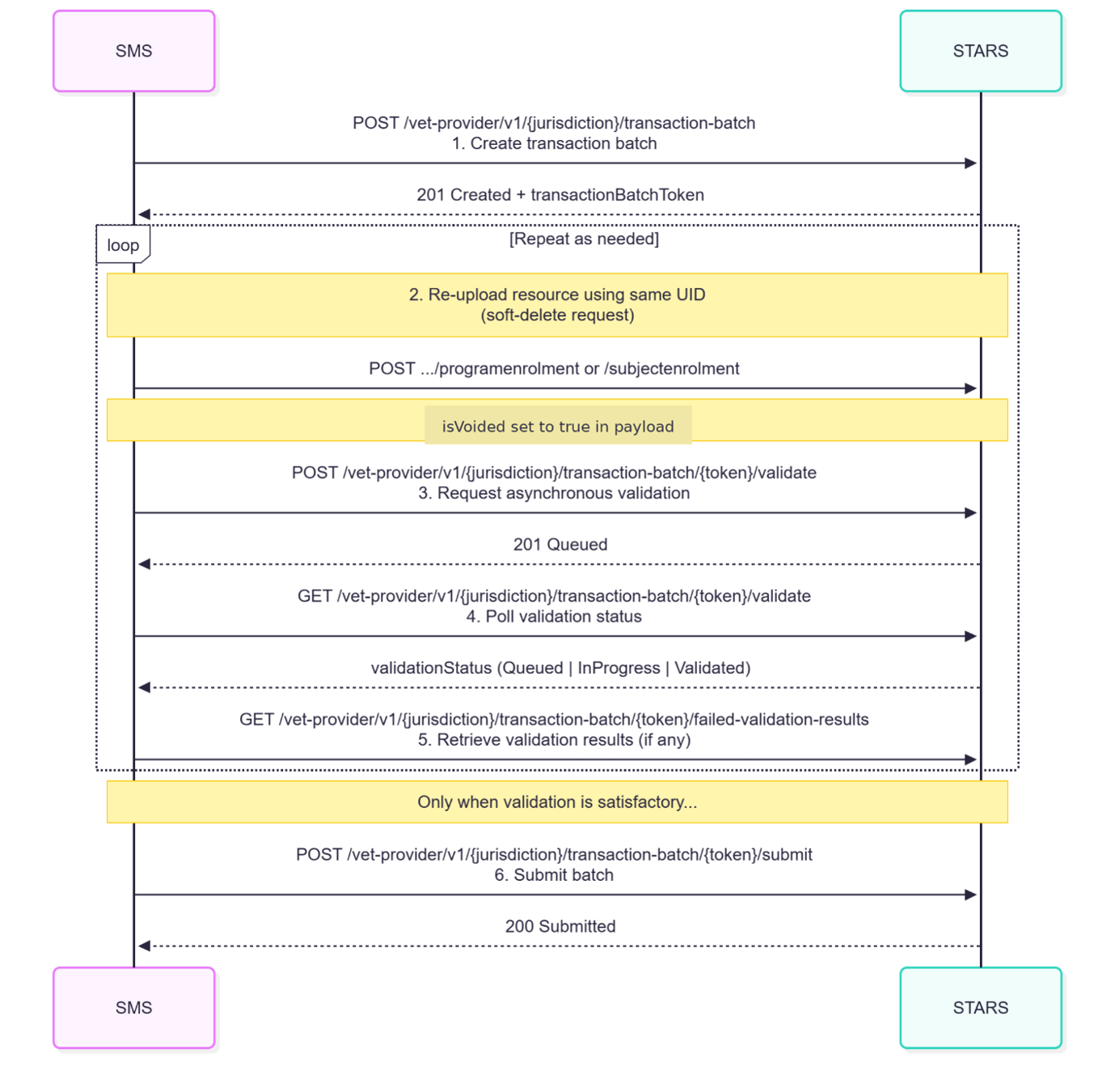
Step‑by‑step flow
Step 1: Create transaction batch
SMS action:
POST /vet-provider/v1/{jurisdiction}/transaction-batchSTARS response:
201 Created with transactionBatchToken
Step 2: Re‑upload resource with isVoided: true
The SMS re‑uploads the resource that was submitted in error using the same resource UID, with
"isVoided": true and voided reason.
Step 3: Request asynchronous validation
SMS action:
POST /vet-provider/v1/{jurisdiction}/transaction-batch/{token}/validateSTARS response:
201 Created (validation queued)
Step 4: Poll for validation readiness
SMS action:
GET /vet-provider/v1/{jurisdiction}/transaction-batch/{token}/validateSTARS response:
{Queued, in progress, validated}
The SMS continues polling until validation status ‘validated’ is returned.
Step 5: Retrieve validation results
SMS action:
GET /vet-provider/v1/{jurisdiction}/transaction-batch/{token}/failed-validation-results
(pagination supported)
If blocking validation failures are returned:
review the validation results
correct the data as required
repeat Steps 2–5 until no blocking validation failures remain.
Step 6: Submit transaction batch
SMS action:
POST /vet-provider/v1/{jurisdiction}/transaction-batch/{token}/submitSTARS response:
200 OK with status Submitted
End state
The resource has been logically (soft) deleted.
The data no longer appears in active reporting while the historical submission remains auditable.