Reference data API usage guide
The reference data APIs provide system-to-system synchronisation capability for authoritative datasets (including classification data).
They are designed for incremental synchronisation (watermark-based) where consumers
Perform an initial full load
Then retrieve only records that have changed since the last successful synchronisation
Page contents:
Business objective
The reference and classification data APIs enable consumers to maintain an up-to-date, authoritative local copy of reference and classification data required for validation, configuration, and regulatory reporting.
These APIs are designed to support efficient, reliable system-to-system synchronisation using incremental (watermark-based) patterns. Consumers retrieve a full dataset once, and then only changes over time, minimising data transfer and ensuring consistency with the source system.
The APIs are intentionally optimised for background synchronisation rather than real-time access.
Key concepts
changedSince – Timestamp used to request incremental updates
Full load – Initial retrieval of all records
Incremental sync – Retrieval of only records changed since the last synchronisation
Watermark – The last successful timestamp stored by the consumer
Supported and unsupported usage
Supported use cases
The reference and classification data APIs are designed for background synchronisation processes:
Batch synchronisation (e.g. nightly or scheduled updates)
Initial data load during system onboarding
Periodic incremental updates using a stored watermark
Unsupported use cases
The APIs are not designed or supported for real-time usage:
Runtime UI lookups (e.g. populating dropdowns dynamically)
Per-request API calls during user interaction
High-frequency synchronous validation calls
Consumers should maintain a local copy of reference or classification data and serve it from their own systems during runtime operations.
API constraints
No single endpoint returns all datasets
Each dataset must be synchronised independently
Responses are paginated and must be fully processed
Records are never physically deleted (only updated or end-dated)
Synchronisation pattern
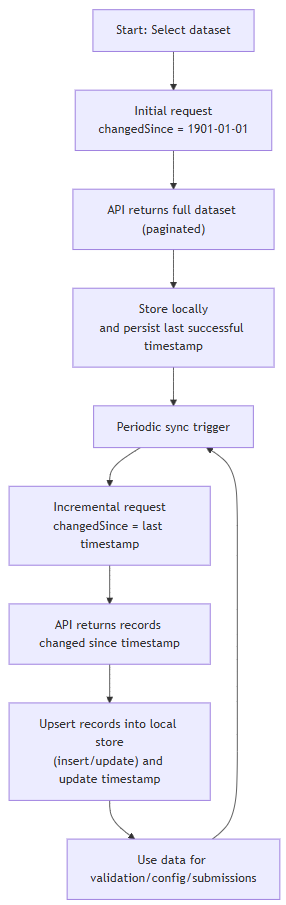
Synchronisation workflow rules
The watermark must only be updated after all pages have been successfully processed
Partial processing must not update the watermark
All pages must be processed before completing a synchronisation cycle
Consumers must apply upsert logic (insert or update)
Synchronisation must be idempotent (safe to retry)
Failure handling
If a synchronisation fails:
Do not update the watermark
Retry using the last successful watermark
Common usage scenarios
Scenario
Purpose
Initial Synchronisation
First-time load when onboarding a system
Incremental Synchronisation
Ongoing updates using watermark
Pre-Release Data Alignment
Align data prior to go-live
Initial synchronisation
Used during onboarding or first-time integration.
Steps
Call the API with changedSince = 1901-01-01T00:00:00Z
Retrieve all pages
Store the dataset locally
Persist the latest timestamp.
Incremental synchronisation
Used for ongoing updates.
Steps
Call the API using the last stored timestamp
Retrieve all pages of changed records
Upsert records into the local store
Update the stored timestamp once processing is complete.
Pre-release data alignment
Used prior to go-live to ensure systems are aligned with production data.
Steps
Perform a full load in a pre-production environment
Run incremental synchronisations up to go-live
Validate data completeness and correctness
Perform a final sync immediately before production cutover.
Sequence diagram
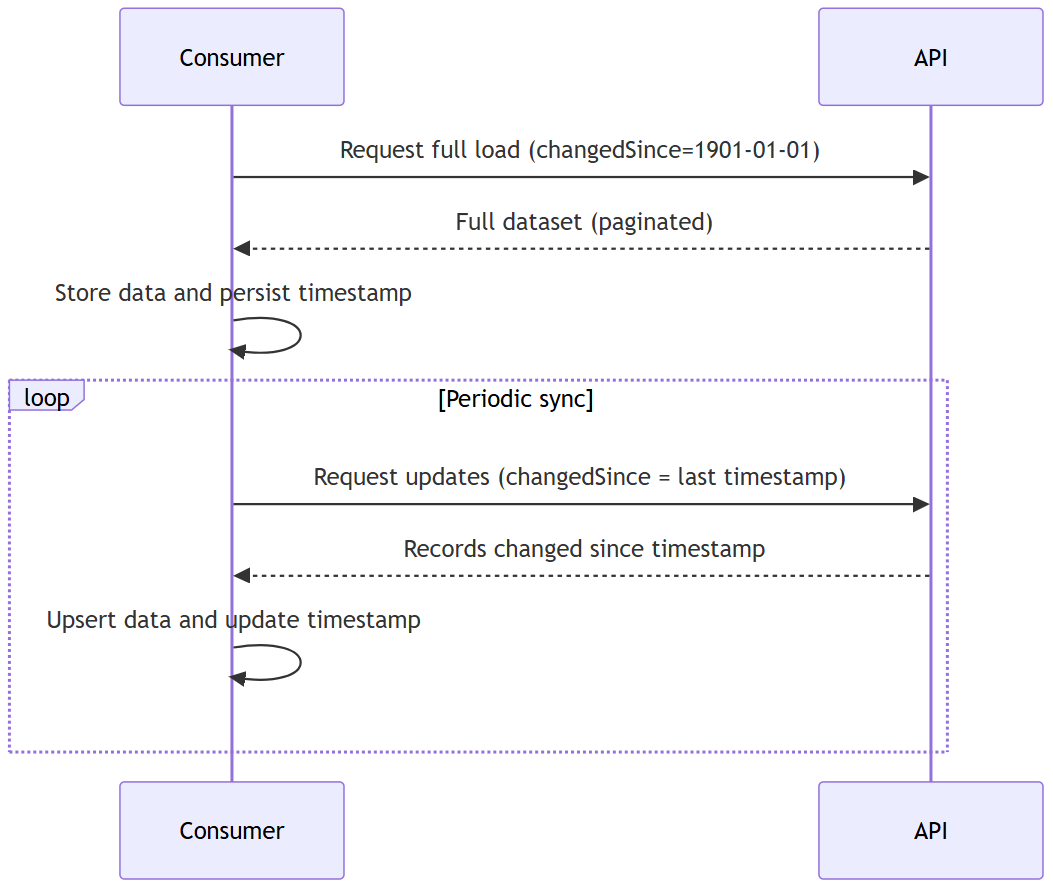
Note: Each dataset is retrieved via a separate endpoint. Consumers must repeat this synchronisation pattern for each dataset.
Endpoint pattern
GET /vet-provider/v1/reference-data/{dataset}?changedSince={UTC datetime}
GET /vet-provider/v1/classification?changedSince={UTC datetime}
Example
GET /vet-provider/v1/reference-data/country?changedSince=2024-01-01T00:00:00Z
Query parameters
Name
Required
Description
changedSince
Yes
UTC date indicating the point from which changes should be returned
PageNumber
No
Page number (default = 1)
PageSize
No
Number of records per page (maximum = 500)
Rules
Use
1901-01-01T00:00:00Zfor full loadUse last successful watermark for incremental loads
Response format
All endpoints return paginated results:
Sample Response 200 OK
Notes
results structure varies per dataset
responses may include active and inactive records
pagination must be fully processed
Error handling
Errors are returned using
application/problem+json
Sample error response
400 Bad Request
Occurs when the request is invalid. Common causes:
Missing changedSince parameter
Invalid datetime format (must be ISO 8601 UTC)
Invalid pagination values (e.g. negative page number, page size > 500)
404 Not Found
Returned when the requested dataset endpoint does not exist.
200 OK (No Results)
A valid request that returns no records:
Occurs when no data has changed since the provided timestamp
Response will include an empty results array
500 Internal Server Error
Returned when an unexpected error occurs on the API.
Incremental synchronisation semantics
The changedSince parameter enables incremental synchronisation by returning only records that have changed since a given point in time.
Watermark behaviour
The changedSince parameter is evaluated against the system's internal change tracking mechanism
Only records changed after the provided timestamp are returned
Consumers do not need to understand or interact with internal timestamps
What counts as a change
A record is returned if it has:
Been created
Been updated (any field change)
Changed status (e.g. active → inactive)
Been superseded or replaced
Deletion behaviour
Records are not physically deleted
Deletions are represented as updates (e.g. end dating)
Missing records must not be treated as deleted
Late arriving changes
Changes are detected using sysEffectiveFrom (system time), not business dates
Historical corrections from the source will be returned in incremental queries
Idempotency
Repeating the same changedSince request is safe
Identical data will not produce duplicate system versions
Data lifecycle behaviour
Deletions are represented as updates
Missing records should not be interpreted as deletions
Historical updates may appear in later responses
Why local storage is required
The Reference Data APIs are optimised for synchronisation rather than real-time access.
Maintaining a local copy ensures
Low-latency runtime access
Reduced dependency on external systems
Improved resilience and availability
Efficient data processing
Consumer responsibilities
Perform an initial full load
Store data locally
Persist the watermark
Process all pages before updating the watermark
Apply upsert logic (insert/update)
Handle inactive and superseded records correctly
Quick summary
Perform full load using 1901-01-01T00:00:00Z
Store watermark
Request changes using watermark
Process all pages
Upsert data
Repeat regularly