Declarations
A declaration is a formal confirmation by a registered training organisation (RTO) that, for a quarterly period, it has met its reporting obligations under the Data Provision Requirements (DPRs).
Declarations are made per reporting period and required within one month from the end of that reporting period. They are used to indicate one of the following outcomes:
the RTO has reported all required activity for the period, or
the RTO had no reportable activity for the period.
A declaration represents the RTO’s confirmation that its reported data for the reporting period is complete and accurate, to the best of its knowledge.
Importantly, making a declaration does not prevent an RTO from submitting corrections or updates to its data. Declarations do not lock records, restrict future submissions, or limit an RTO’s ability to correct previously reported information where required.
If an RTO makes updates or corrections to data previously submitted for a reporting period after a declaration has been made, the RTO may be required to submit a new declaration to confirm its updated reporting position for that period.
For more information on reporting obligations, please see the Guide to the RTO Data Provision Requirements.
Page contents:
Where declarations fit in the STARS lifecycle
Declarations occur after data submission activities and data quality checks, and must be done for a reporting period before it is considered complete for an RTO.
From a lifecycle perspective:
Training activity data is validated and submitted to STARS
Reconciliation should be used to review what data STARS currently holds and identify any gaps or corrections
The RTO requests data quality checks and retrieves results
The RTO confirms there are no remaining data quality errors for the reporting period - if there are, those errors must be addressed before the declaration can be made
The RTO makes the declaration for the reporting period, confirming the appropriate reporting outcome
The RTO's reporting activities are complete for this period. Note, this does not prevent additional records being submitted or updates where required
Declarations apply to reporting periods, not directly to the timing of student activity. Student activity may span reporting periods, and corrections to previously reported data may occur independently of current‑period activity, including after a declaration has been made.
Types of declarations
There are two types of declarations that an RTO may make for a quarterly period. An RTO only needs to submit one type per reporting period based on their activity throughout the period:
Declaration
Used when the RTO has reportable activity and confirms that all required data for the reporting period has been submitted. A declaration should also be used in circumstances where the RTO has continued to deliver training, but has not had any updates to student records and therefore didn't report any data in the reporting period.Nil activity report (NAR)
Used when the RTO confirms that it had no training activity for the reporting period. A nil activity report should be used only where both of the following are true for the reporting period: the RTO has not enrolled any new students and has not delivered any training or assessment.
What a declaration looks like
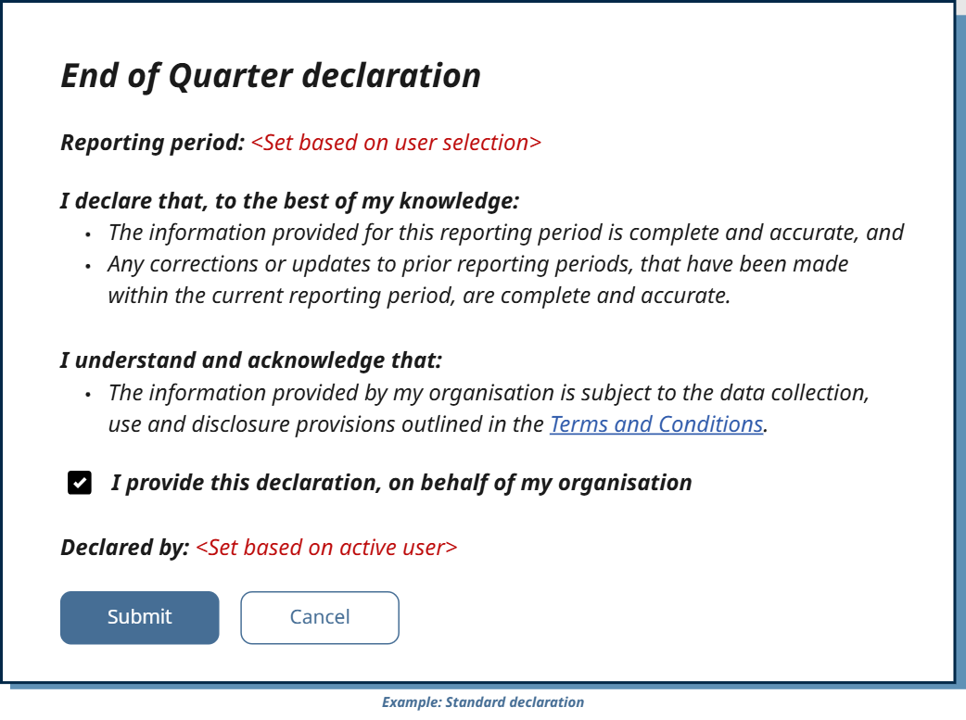
When making a declaration, RTO users should see standard text that outlines the formal confirmation under the Data Provision Requirements.
For a standard declaration, this text is:
I declare that, to the best of my knowledge:
·  The information provided for this reporting period is complete and accurate, and
·  Any corrections or updates to prior reporting periods, that have been made within the current reporting period, are complete and accurate.

I understand and acknowledge that:
·  The information provided by my organisation is subject to the data collection, use and disclosure provisions outlined in the Terms and Conditions.
Note: ‘Terms and Conditions’ should be a hyperlink to the STARS and MyVET Data Portal Terms and Conditions that will be published on the MyVET Data Portal here: https://myportal.vetdata.edu.au/conditions.
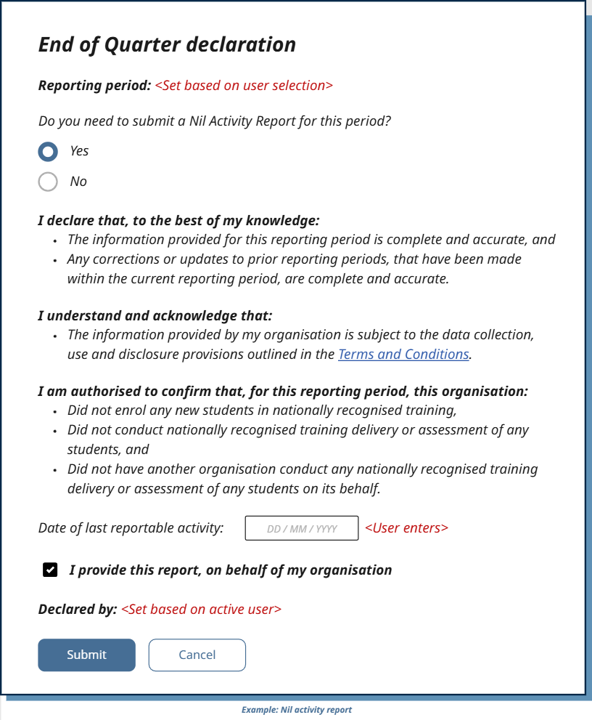
For a nil activity report, the standard declaration text should be accompanied by this additional section:
I am authorised to confirm that, for this reporting period, this organisation:
·  Did not enrol any new students in nationally recognised training,
·  Did not conduct nationally recognised training delivery or assessment of any students, and
·  Did not have another organisation conduct any nationally recognised training delivery or assessment of any students on its behalf.
Example wireframes are provided below to illustrate how this could look in an SMS user interface.
Both outcomes represent a declaration by the RTO that it has met its reporting obligation for that period. The appropriate outcome depends on the RTO’s circumstances, including whether activity occurred and whether any data was required to be submitted.
Where an RTO has no current‑period activity but submits corrections to previously reported data, those submissions and the declaration outcome for the current period are treated as distinct activities, even if they occur close together in time.
Available declaration end points
Declarations allow SMS suppliers to retrieve, record and update an RTO’s reporting outcome for a reporting period under the Data Provision Requirements (DPRs). They are independent of data submission and reconciliation.
Retrieve declaration
GET /vet-provider/v1/declaration
Used to retrieve the latest declaration recorded for a specified reporting period.
Retrieves the declaration due date for the given
reportingPeriod, along with details of the most recently submitted declaration if one has been submittedSupports national reporting periods from 202601 up to the current quarter
Returns the declaration outcome (declaration or nil activity report) currently held by STARS for that reporting period, if one has been submitted.
Any results not meeting applied filters or where no declaration has been submitted will be returned as null with the declarationDueDate returned for the queried reporting period.
Submit declaration
POST /vet-provider/v1/declaration
Used to submit a declaration confirming an RTO’s reporting outcome for a reporting period. This includes both standard declarations and nil activity reports, which are submitted as declaration outcomes.
Supports:
Declaration – where reportable activity has occurred, and all required data has been submitted
Nil activity report (NAR) – where no reportable activity occurred for the reporting period
Requires an explicit acknowledgement by the RTO that the declaration is complete and accurate
If more than one declaration is submitted for the same reporting period, the most recent declaration represents the current reporting position for that period.
Note that nil activity reports are not submitted via a separate endpoint. They are treated as a declaration outcome and submitted through the same declaration endpoint.
How declaration submission works
Declaration submission records an RTO’s stated reporting outcome for a specific reporting period. Each submission represents an attestation by the RTO that the declaration outcome accurately reflects its reporting position for that period at the time of submission.
Reporting period–based submission
Declarations are always submitted against a reporting period. The reporting period identifies the timeframe for which the RTO is confirming its reporting obligation, regardless of when student activity occurred or when individual records were submitted.
An RTO is expected to submit a declaration once it has
completed any required data submissions for the reporting period, and
satisfied itself that its reporting position for the period is correct.
Acknowledgement requirement
Each declaration submission includes an explicit acknowledgement by the RTO that:
it is authorised to make the declaration, and
the statement being made for the reporting period is true and accurate to the best of its knowledge.
This acknowledgement is required for all declaration outcomes, including nil activity reports.
Superseding behaviour
If more than one declaration is submitted for the same reporting period, the most recent declaration supersedes any previous declaration for that period.
This allows RTOs to:
submit an initial declaration, and
later submit an updated declaration if circumstances change, such as after correcting previously reported data.
Earlier declarations are not removed but are no longer considered the current declaration for the reporting period.
Relationship to data submission and reconciliation
Submitting a declaration:
does not submit or amend training activity data,
does not prevent further data submissions or corrections, and
does not change the availability of reconciliation.
Declarations are therefore independent of data submission and reconciliation activities, and exist solely to record the RTO’s reporting outcome for the reporting period.
Timing considerations
Declarations may be submitted at any time once an RTO is ready to confirm its reporting position for a reporting period. The timing of declaration submission is separate from:
the timing of data submissions, and
the reporting due dates defined under the Data Provision Requirements (DPRs).
Note a nil activity report must be provided before one month after the start of the next reporting period. There is no system control blocking the late submission of a NAR.
POST declaration API
The following fields are used when submitting a declaration via
POST /vet-provider/v1/declaration
Field
Description
reportingPeriodNumber
Only one reportingPeriodNumber may be provided.
Allowed values: 202601 up to the current reporting quarter
Format: {CalendarYear}{Quarter} (e.g. 202603).
jurisdiction
The jurisdiction associated with the reporting period.
Allowed values: NAT, NSW, VIC, QLD, WA, SA, TAS, ACT, NT.
declarationType
Only one declarationType may be provided.
Allowed values:DeclarationNil_activity_report
dateOfLastReportableActivity
Mandatory when declarationType is Nil_activity_report.
Must be prior to the start date of the declared reporting period.
RTOAcceptanceOfDeclaration
Must be set to true to submit the declaration.
RTOUserName
Name of the authorised person making the declaration via an SMS or API.
Maximum 80 characters.
RTOUserEmailAddress
Email address of the authorised person.
Maximum 320 characters.
Must contain an @ symbol.
GET declaration API
GET /vet-provider/v1/declaration
The following fields may be supplied when retrieving declarations.
Note that either ReportingPeriodNumber OR StartDate and EndDate must be supplied.
Field
Description
reportingPeriodNumber
One or more reporting period numbers may be provided
Allowed range: 202601 up to the current reporting quarter
Minimum: 1 value
Maximum: 10 values
Format: {CalendarYear}{Quarter} (e.g. 202603)
jurisdiction
The jurisdiction associated with the reporting period.
Allowed values: NAT, NSW, VIC, QLD, WA, SA, TAS, ACT, NT.
declarationTypes
One or more declaration types to filter by
Allowed values:
Declaration
Nil_activity_report
startDate
Used to filter declarations from a specified date onward
Must be on or after 202601 and not beyond the current quarter
Must not be later than today's date
endDate
Used to filter declarations up to a specified date
Must be on or after 202601 and not beyond the current quarter
Must not be later than today's date
pageNumber (optional)
Default: 1
Maximum: 100
pageSize (optional)
Default: 10
Maximum: 100
sortOrder (optional)
Controls the order of results
Allowed values:
Asc
Desc
Example scenarios using declaration APIs
The following scenarios illustrate common ways SMS suppliers and RTOs use declaration APIs to confirm reporting outcomes for a reporting period.
These examples focus on typical declaration behaviours and system responses, rather than exhaustive API mechanics or policy interpretation.
Scenario 1 – Retrieve the details of the most recent declaration and the declaration due date for a given reporting period
Sequence overview
The SMS retrieves the details of the most declaration for a reporting period using the GET declaration endpoint and handles the response returned by STARS.
Pre‑requisites
The client software is registered and authenticated to interact with the STARS APIs.
Data for the reporting period has been submitted/not submitted.
The user making the declaration is authorised to do so on behalf of the RTO.
Step‑by‑step flow
Step 1: Retrieve the declaration
SMS action:
GET /vet-provider/v1/declaration
Query parameters example
STARS Response: 200 OK
A success message is returned in the response body.
Step 2: Handle the response message
Response (summary‑level)
The response contains a paged list of declaration records matching the supplied filters.
Scenario 2 – Submit a declaration
Sequence overview
The SMS submits a declaration for a reporting period using the declaration endpoint and handles the response returned by STARS.
Pre‑requisites
The client software is registered and authenticated to interact with the STARS APIs
Data for the reporting period has already been submitted
The user making the declaration is authorised to do so on behalf of the RTO
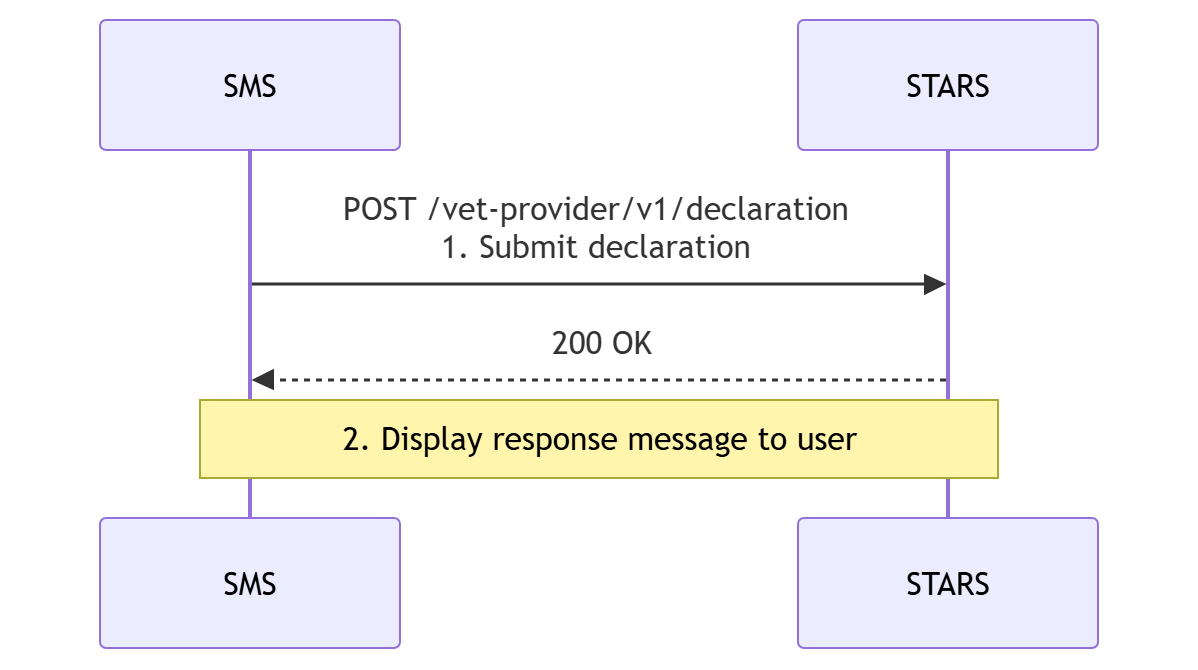
Sequence diagram
Note: Security and authentication flows are not shown.
Step‑by‑step flow
Step 1: Submit the declaration
SMS action:
POST /vet-provider/v1/declarationRequest payload example:
STARS Response:
200 OK
A success message is returned in the response body.
Step 2: Handle the response message
The SMS displays the response message to the user and retains appropriate information for confirmation or audit purposes. For example:
“Declaration successfully saved for the reporting period 202601 - NAT. If this declaration is being made more than a month after the end of the reporting period, you may be contacted to give a reason for non‑compliance with reporting requirements.”
The message should be visible to the user and retained as appropriate for audit or confirmation purposes.
End state
The declaration has been successfully recorded in STARS for the specified reporting period.
Scenario 3: Submit a nil activity report (NAR)
Sequence overview
The SMS submits a nil activity report for a specified reporting period and handles the response returned by STARS.
Pre‑requisites
The client software is registered and authenticated to interact with the STARS APIs
No data has been submitted for the reporting period
The user submitting the nil activity report is authorised to do so on behalf of the RTO
Sequence diagram
Note: Security and authentication flows are not shown.
Step‑by‑step flow
Step 1: Submit the nil activity report
SMS action:
POST /vet-provider/v1/declarationRequest payload example:
STARS Response:
`200 OK`
A success message is returned in the response body.
Step 2: Handle the response message
The SMS displays the response message to the user and retains appropriate information for confirmation or audit purposes.
For example:
“Nil_activity_report successfully saved for the reporting period 202601 - NAT. If this Nil_activity_reportis being made more than one month after the end of the reporting period, you may be contacted to give a reason for non‑compliance with reporting requirements.”
End state
The nil activity report has been successfully recorded in STARS for the specified reporting period.