Transaction batch
Overview
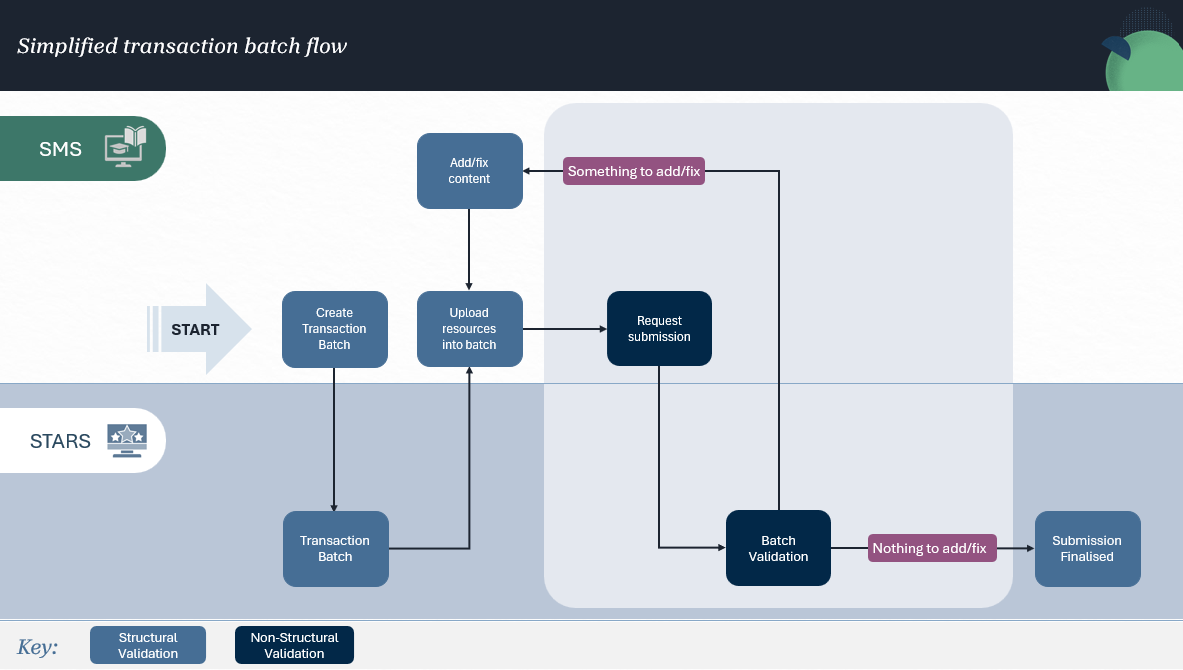
All resources are uploaded through a transaction batch. The order of an upload is flexible so as long as the mandatory validations are satisfied by the submission time.
Create and manage a batch
A transaction batch must be created before any reporting data can be uploaded.
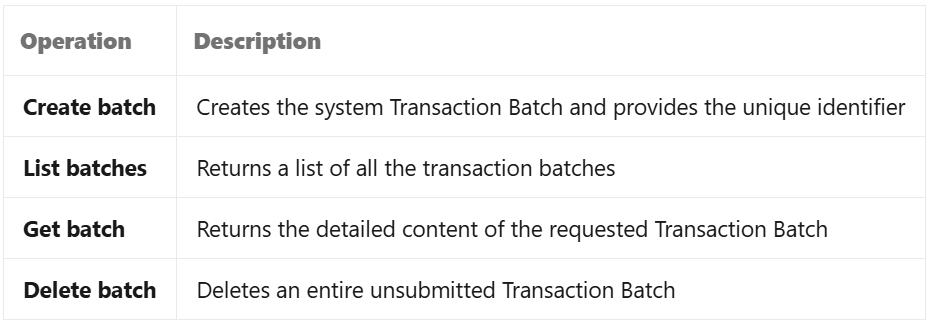
When a transaction batch is created, STARS assigns a unique transaction batch identifier. This identifier is used for all subsequent operations on the batch, including uploading resources, validation and submission.
The following operations are available to manage transaction batches
Jurisdiction
A jurisdiction must be specified when a transaction batch is created.
The jurisdiction is permanently associated with the transaction batch and cannot be changed. If a different jurisdiction is required, a new transaction batch must be created.
Upload resources
Resources are uploaded into a transaction batch and remain in a draft state until the batch is submitted.
Resources may be uploaded
Individually or in bulk
Across multiple upload requests
In any order
As new records or replacement of existing records within the batch.
For example, students, enrolments, offerings and locations do not need to be uploaded in a specific sequence, provided all required relationships exist when validation or submission occurs.
Structural validation
When resources are uploaded, STARS performs structural validation.
This includes checking that
Required fields are present
Data types and formats are valid
Identifiers conform to expected formats
Resource payloads meet API requirements.
Business rules are not evaluated during upload.
Nullability and conditional requirements
Some fields may be optional when a record is first uploaded but become mandatory when the transaction batch is validated or submitted.
STARS applies conditional requirements defined by the VET Information Standard during validation and submission processing.
As a result
Validation may identify fields that were acceptable during upload but are required for formal submission
All mandatory and conditional requirements must be satisfied before submission can succeed.
Validate a transaction batch
Validation is a separate operation that evaluates the transaction batch as a whole.
Once records have been uploaded, a validation request can be initiated to assess whether the batch satisfies applicable business rules and reporting requirements.
During validation, STARS evaluates
Record completeness
Cross-resource relationships
Conditional business rules
Data quality requirements
Reporting rule compliance.
Validation results are returned for each affected record, allowing errors and warnings to be reviewed and corrected before submission.
Submit a transaction batch
Once validation issues have been addressed, the transaction batch can be submitted.
Submission moves the transaction batch into a formally reported state and transfers custodianship of the reported data to NCVER.
After submission the transaction batch becomes read-only. Records within the batch cannot be modified, so corrections must be submitted through a new transaction batch.
Transaction batch processing
Validation and submission processing are asynchronous operations.
When validation or submission is requested, processing occurs in the background and the client should monitor the transaction batch status to determine when processing has completed.
Until processing is complete, the batch status reflects the current stage of processing.
Transaction batch retention
Clients are expected to actively manage and remove transaction batches that are no longer required.
Transaction batch expiry is intended as a safeguard for abandoned or stale batches rather than as a routine management mechanism. Automatic expiry has not yet been implemented and may be refined based on production usage patterns.