Core business outcomes - what STARS enables
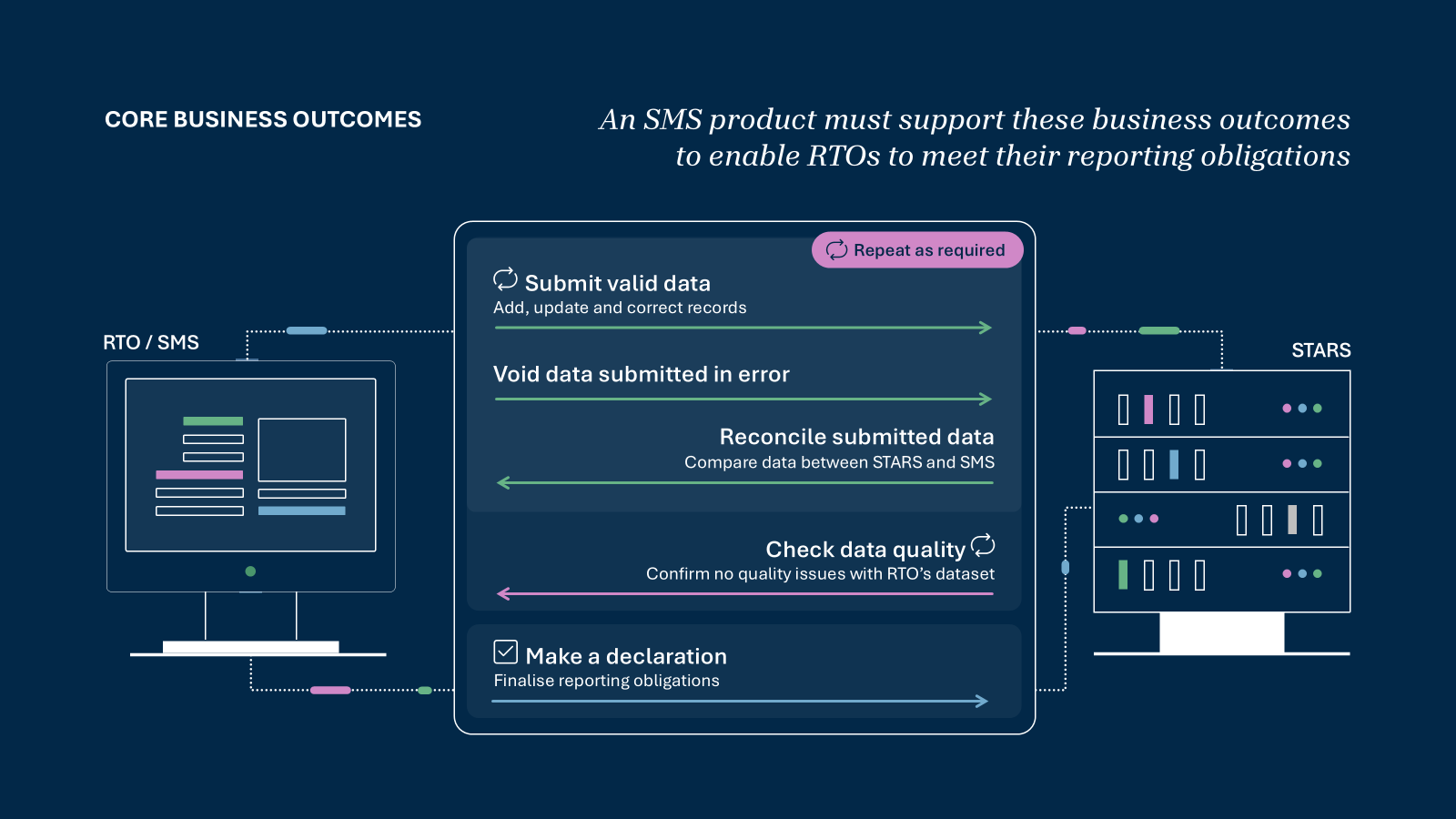
This page explains concepts that are used across the Student Training and Activity Reporting System (STARS) as the five business outcomes that student management systems (SMS) need to meet in order to functionally interact with STARS and to be granted access to the STARS production environment upon readiness.
Please note: the information on this page is subject to change and is being expanded progressively.
This content is only applicable to stage 1 of the VDS project - the transition of RTOs who only deliver fee-for-service activity. Stage 2 APIs will be added from as early as March 2027 as state and territory governments transition. These are anticipated to include changes to the placement of elements and the addition of resources in the API (that may also impact placement of Stage 1 elements).
Page contents:
Business outcomes - overview
At a minimum, an SMS product must support the following business outcomes to enable RTOs to meet their reporting obligations under the Data Provision Requirements (DPRs):
Submit valid data
Validate and submit reportable student training activity data to STARS and receive confirmation that the data has been successfully reported. Submissions may occur progressively throughout a reporting period as training activity takes place.
Reconcile previously submitted data
Review what data STARS currently holds for an RTO and compare it with local SMS records to confirm alignment and identify gaps or discrepancies requiring submission, updates or deletes.
Void data submitted in error
Void records that were submitted in error, using a controlled and auditable process.
For records requiring updates, those should be managed via resubmission, not voiding.
Check data quality
Review data quality outcomes across the RTO’s reported dataset to identify issues before reporting is finalised. Data quality operates at a whole‑of‑dataset level.
Make a declaration
Submit an end‑of‑quarter declaration or a nil activity report confirming that reporting obligations for the reporting period have been completed by the RTO.

Standard workflows for business outcomes
The happy path describes the standard, recommended flow where no errors or exceptional conditions occur. It shows how an SMS or RTO would ideally complete each business outcome under normal conditions.
Submit valid data
This flow describes the recommended way to submit valid training activity data to STARS during a reporting period.
Reconcile existing data
Compare local SMS records with what is already held in STARS to identify records that require submission, update, or removal.Create a transaction batch
Create a transaction batch, which acts as a container for data the SMS will upload and submit.Upload data to STARS
Upload the prepared data to the transaction batch so it can be checked before submission.Validate uploaded data
Trigger validation to allow STARS to apply VET IS rules and confirm the data is structurally and logically valid.Submit validated data
Submit the validated data so it becomes part of the RTO’s reported dataset for the reporting period.Receive submission confirmation
STARS confirms successful submission, and the data becomes available for future reconciliation.
Reconcile previously submitted data
Reconciliation allows an SMS or RTO to confirm which records exist in STARS for a reporting period and whether those records are aligned with local system data.
It is a read‑only capability and does not create, update, or remove data.
Request reconciliation data
The SMS requests reconciliation information for a reporting period, specific records, or a known starting record.STARS identifies matching records
STARS evaluates the request and identifies relevant top‑level records based on student activity date and the reconciliation method used.STARS returns summary‑level results
STARS returns minimal metadata for each matching record, including:
- resource identifier
- last submission date
- current change tracking identifier.
Full record content is not returned.Compare results with local SMS records
The SMS compares reconciliation results with locally stored records and change tracking identifiers.Determine required action
Based on the comparison, records are identified as:
- already current
- missing from STARS
- out‑of‑sync and requiring update, or
- incorrectly submitted and requiring correction or voiding.
How reconciliation is typically used
Before submitting new or updated data, to establish a clear baseline
During a reporting period, to support internal reporting and monitoring
Before closing out a reporting period, to confirm reporting completeness ahead of data quality checks and declarations.
Void data submitted in error
This flow describes the recommended way to void data that was genuinely submitted in error.
Removal is a controlled corrective action and should not be used for routine updates or corrections.
Reconcile existing data
Compare local SMS records with what is held in STARS to identify records that were previously submitted and may require void.Confirm a genuine submission error
Determine that the record
- exists in STARS, and
- was submitted in error and cannot be corrected through an update.Create a transaction batch
Create a transaction batch to contain the void request.Upload the record flagged for void
Re‑upload the same resource identifier with an isVoided flag set, indicating the previously submitted record should be voided.Validate the void request
STARS validates the request to confirm it is structurally valid and eligible for submission.Submit the validated batch
Submit the batch to confirm the removal.Receive confirmation of void
STARS confirms successful processing, and the record no longer appears in active reporting or reconciliation results.
Check data quality
Checking data quality allows an RTO to review the overall quality of its reported dataset for a reporting period before finalising reporting.
Data quality validation is performed across the entire RTO dataset, not at an individual submission or file level.
Ensure data has been submitted for the reporting period
The RTO submits all relevant training activity data for the reporting period.Run data quality checks
Data quality checks are triggered either
- automatically by STARS, or
- on request from the SMS.Review data quality results
STARS returns data quality outcomes to the SMS for review.Address any data quality issues
If data quality issues are identified, the RTO corrects the underlying data and re‑submits as required.Confirm readiness to declare
Data quality must be satisfactory before end‑of‑period declaration can be completed.
Notes
Data quality checks operate on the RTO’s dataset as a whole.
Unresolved data quality issues may block submission of a declaration.
Make a declaration or nil activity report
Making a declaration allows an RTO to formally confirm that it has met its reporting obligations for a reporting period under the Data Provision Requirements (DPRs).
Declarations are period‑based and do not submit or amend training activity data.
Complete reporting activities for the period
The RTO submits all required training activity data for the reporting period, or confirms that no activity occurred.Review reported data
Reconciliation and review are used to confirm what STARS currently holds for the reporting period.Confirm declaration outcome
The RTO determines the appropriate outcome for the period:
- Declaration – reportable activity occurred and required data has been submitted, or
- Nil activity report (NAR) – no students were enrolled and no training was delivered during the period.Submit the declaration
The RTO submits the declaration for the reporting period, including an explicit acknowledgement by the authorised RTO user.Receive confirmation
STARS confirms the declaration has been recorded as the RTO’s current reporting position for that period.
Reporting across jurisdictions and pathways
STARS supports the reporting of VET activity data across multiple reporting pathways, reporting periods and jurisdictions to accommodate the range of reporting obligations that apply across the VET sector nationally.
Depending on their obligations, training organisations may need to submit data through different pathways and for different jurisdictions. SMS suppliers should understand how reporting pathways, reporting obligations, reporting periods and jurisdictions work together to determine when data is submitted and the assessment scope used for validation, data quality assessment and declaration, so they can support customers in meeting their VET IS reporting obligations.