Validation scenario - handling a single blocking validation failure
This scenario demonstrates how an SMS supplier:
uploads a resource that fails validation
retrieves validation results
interprets the validation result metadata
corrects the data
successfully submits the transaction batch
This scenario demonstrates how to retrieve and interpret a single validation result produced by technical rule BRTS01180.
Key concept demonstrated
Validation result attributes (
validationGroupingId,relatedValidationResultCount,ruleId,technicalRuleId,resourceType,resourceUID,accessPath,changeTrackingIdentifier, anddataSource)
Rule description
This is the rule we will use for this scenario.
Technical Rule: BRTS01180
A Student with surveyAvailability set to "Available" must provide a value for emailAddressPrimary.
Minimal unit record context
This scenario represents a first-time Student submission and you can use the Minimal Unit Record (MUR) as the starting point.
For simplicity, only the Student resource relevant to this validation failure is shown. In a real submission, all required MUR resources must be uploaded before the transaction batch is submitted.
Scenario overview
Upload a Student resource where:
surveyAvailability= "Available"emailAddressPrimaryis not provided
The Student upload is accepted into the transaction batch and STARS executes synchronous validation.
A blocking validation failure is detected.
Retrieve the validation results, identify the affected Student and attributes involved in the validation, correct the data, and successfully submit the transaction batch.
Sequence diagram
Security and authentication flows are not shown.
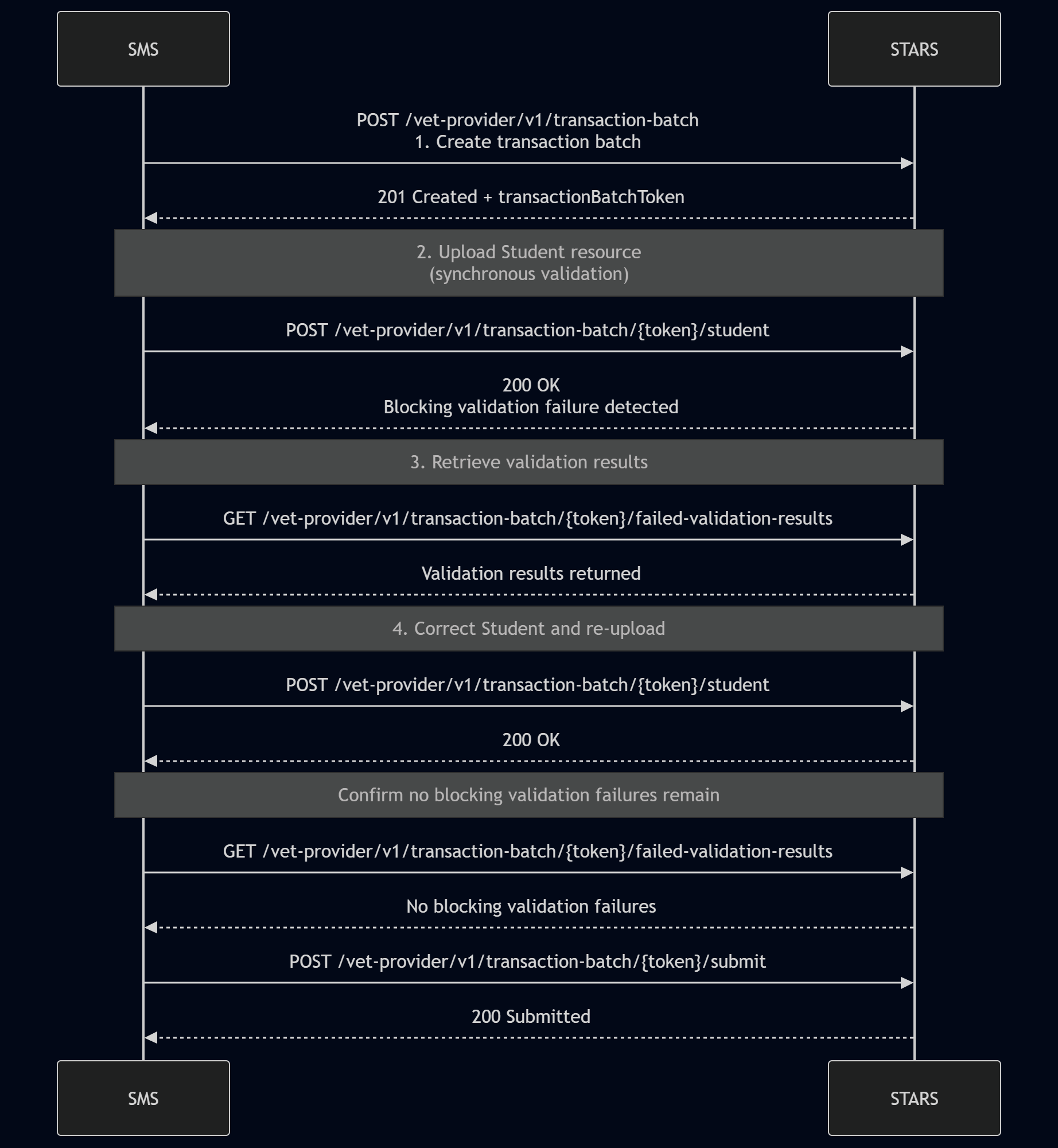
Step by step flow
Step 1 – Create transaction batch
SMS action
POST /vet-provider/v1/transaction-batch
STARS response
201 Created
A transactionBatchToken is returned.
Step 2 – Upload Student resource
Upload a Student resource that violates technical rule BRTS01180.
The upload is accepted into the transaction batch and STARS executes validation synchronously.
The response indicates that blocking validation failures have been detected.
Example:
Step 3 – Retrieve validation results
Retrieve validation results for the transaction batch.
SMS action
GET /vet-provider/v1/transaction-batch/{token}/failed-validation-results
Example response excerpt:
Understanding this validation result
Rule identification
"ruleId": "BRDG00017",
"technicalRuleId": "BRTS01180"
ruleIdidentifies the VET IS business rule.technicalRuleIdidentifies the STARS technical rule implementation.
Resource identification
"resourceType": "Student",
"resourceUID": "b3a6b5d6-8a3a-4d7a-9e19-2c3c5c73f0d1"
These values identify the specific Student resource that failed validation.
AccessPath
The rule evaluates both attributes.
Although the failure is caused by the missing emailAddressPrimary, the rule only applies when surveyAvailability is "Available", therefore both attributes are included in the validation result.
The accessPath values identify the specific attributes involved in the validation failure and should be used to locate, highlight, or navigate users directly to the fields requiring review.
changeTrackingIdentifier
"changeTrackingIdentifier": "Student-CTI-20260415-001"
This identifies the version of the Student resource that produced the validation result.
Use this value to correlate the failure back to the version of data that was submitted.
validationGrouping
"validationGroupingId": "86dc9cef4e1e2210659183d3b843fdbc",
"relatedValidationResultCount": 1
This rule execution produced a single validation result.
A relatedValidationResultCount of 1 indicates that there are no additional resources involved in this validation failure.
dataSource
"dataSource": "Transaction_batch"
This indicates that the Student resource involved in the validation was supplied in the current transaction batch.
correctiveAction
"correctiveAction": "Provide a value for emailAddressPrimary"
This describes the minimum change required to satisfy the rule.
Step 4 – Correct the Student resource
Correct the Student and re-uploads the resource using the same studentUID.
Retrieve the transaction batch validation results again and confirm that no blocking validation failures remain.
Step 5 – Submit transaction batch
SMS action
POST /vet-provider/v1/transaction-batch/{token}/submit
STARS response
200 Submitted
End state
The transaction batch is submitted successfully with no blocking validation failures.