Scenario - Upload an enrolment (registration)
Note: jurisdiction has now been added to transaction batch route.
This scenario explains how a student management system (SMS) submits a first‑time enrolment by registering students and their related training activity.
It describes how to create and manage a transaction batch, upload the required linked resources using the minimal unit record (MUR), and record enrolments with a Registered lifecycle state.
The scenario also outlines the recommended validation approach to support data quality while reducing unnecessary validation requests and system impact.
Key points:
Explains the process for registering an enrolment
upload an enrolment using the minimum unit record definition
create and manage a transaction batch
request asynchronous validation only when data entry is complete
correct any identified issues before re‑validating and submitting the transaction batch.
Note: Other enrolment lifecycle states and reporting flows are demonstrated in other scenarios.
Minimal unit record context
This scenario represents a first‑time enrolment submission and uses the minimal unit record (MUR) as a starting point. The MUR provides a minimal, structurally valid representation of enrolment data that supports early development and testing.
In this scenario, MUR‑based payloads are used to demonstrate initial data entry and validation behaviour. Once data has been uploaded into the transaction batch, subsequent updates focus on supplying only the minimum fields required to correct or adjust data, rather than resubmitting the full MUR payload.
See also Minimal unit record.
Sequence overview
An SMS creates a transaction batch, uploads one or more sets of linked top‑level resources, requests asynchronous validation, polls for validation completion, retrieves validation results, and submits the transaction batch once validation is successful.
Sequence diagram
Note: Security and authentication flows are not shown.
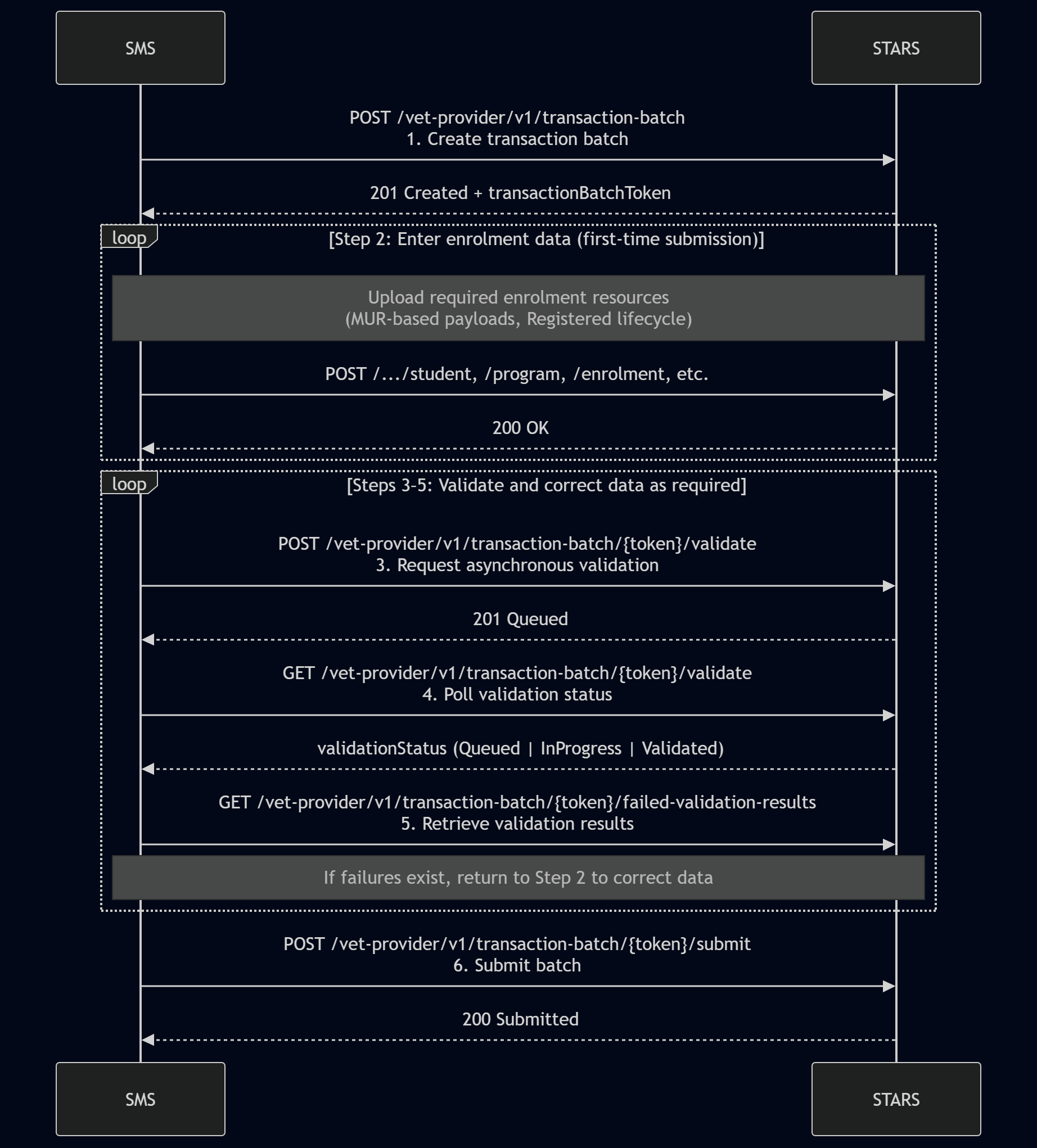
Step‑by‑step flow
Step 1: Create transaction batch
POST /vet-provider/v1/{jurisdiction}/transaction-batchReturns
transactionBatchToken
Step 2: Enter enrolment data (first‑time submission)
Upload enrolment data using MUR‑based payloads
Resources may be uploaded incrementally (Student, Program, Enrolment, etc.)
Lifecycle state is Registered
This step may be repeated until the SMS user determines that all required data has been entered.
Step 3: Request asynchronous validation (recommended)
POST /vet-provider/v1/{jurisdiction}/transaction-batch/{token}/validateValidation is queued
Step 4: Check validation status
GET /vet-provider/v1/{jurisdiction}/transaction-batch/{token}/validateCheck whether validation has completed (
validationStatus=Validated)
Step 5: Retrieve failed validation results
GET /vet-provider/v1/{jurisdiction}/transaction-batch/{token}/failed-validation-results
If blocking failures are returned
Review failed validation results
Return to Step 2 to correct data, noting each upload must include the complete top-level resource and all current child objects
Repeat Steps 3–5 as required.
This loop may occur multiple times, but validation re‑runs should be limited until all corrected data is uploaded.
Step 6: Submit transaction batch
POST /vet-provider/v1/{jurisdiction}/transaction-batch/{token}/submitBatch is submitted once validation returns no blocking failures
End state
The enrolment data has been submitted to STARS with a Registered lifecycle state.
Validation and testing
The Reconciliation UID Match can be used to check that the change tracking identifier matches the change tracking identifier submitted.