Scenario – Handling multiple blocking validation failure
This scenario demonstrates how an SMS supplier:
submits a Delivery Location deletion request that fails validation
retrieves multiple related Validation Results
interprets
validationGroupingIdinterprets
relatedValidationResultCountidentifies the resources involved in the validation
interprets validation result metadata
resolves the validation failure
successfully submits the transaction batch
The scenario uses technical rule BRTS02180 to demonstrate how a single validation rule execution can produce multiple related Validation Results.
Key concepts demonstrated
Validation Result attributes (
validationGroupingId, relatedValidationResultCount, errorNumber, technicalRuleId, resourceType, resourceUID, accessPath, changeTrackingIdentifier,anddataSource)multiple Validation Results produced by a single validation rule execution
Rule description
Technical Rule: BRTS02180 -- A Delivery Location cannot be voided if referenced by any SubjectEnrolment location.
Scenario Overview
Submit a request to delete an existing Delivery Location.
The Delivery Location is referenced by a Subject Enrolment that has previously been submitted to STARS.
The deletion request is accepted into the transaction batch.
Client requests transaction batch validation.
During validation, STARS detects a blocking validation failure.
The validation rule produces two related Validation Results:
one for the Delivery Location being deleted
one for the Subject Enrolment that references the Delivery Location
Retrieve the validation results and uses the shared validationGroupingId and relatedValidationResultCount to understand that both Validation Results belong to the same rule execution and should be interpreted together.
Sequence Diagram
Security and authentication flows are not shown.
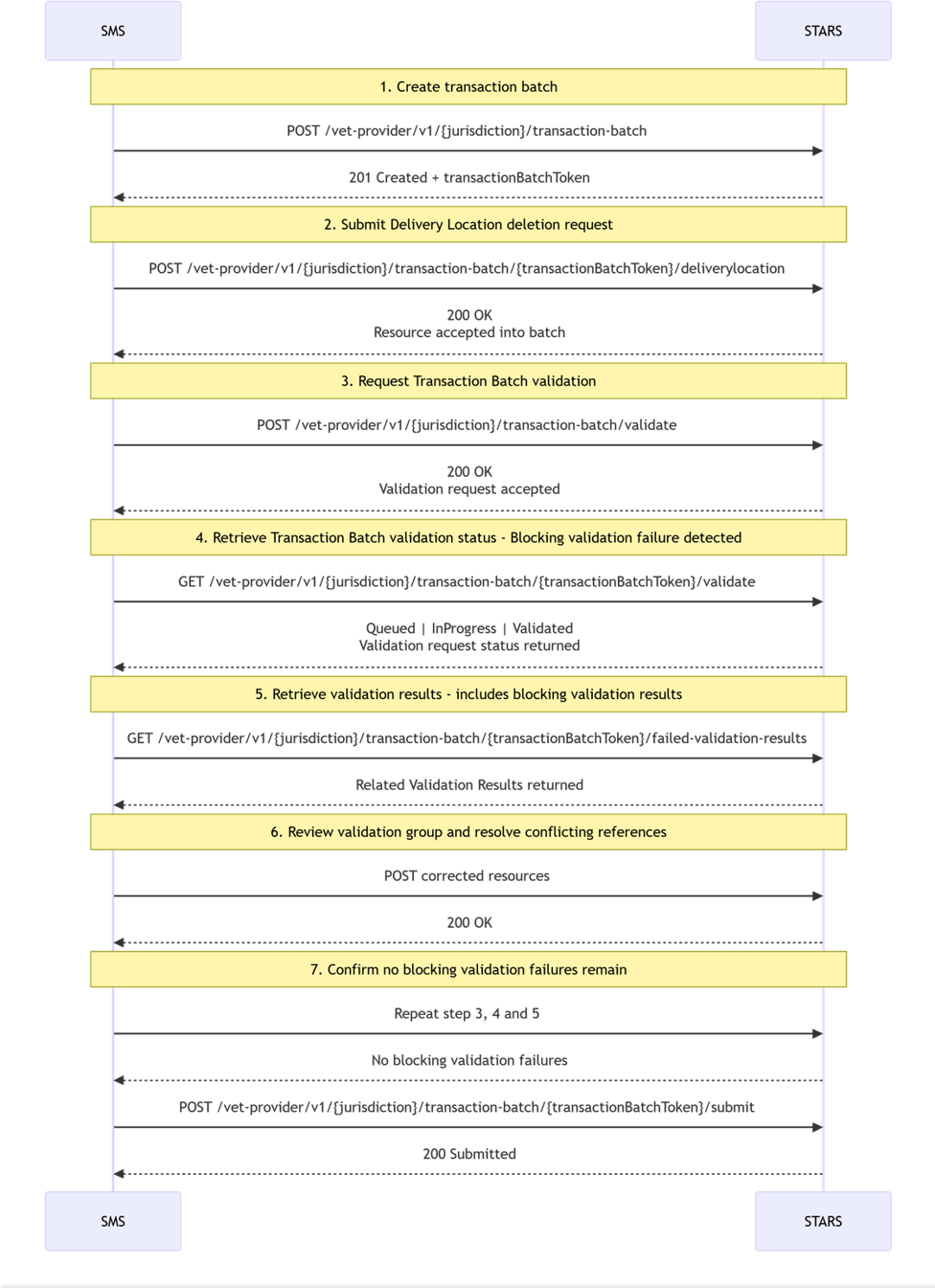
Step-by-step flow
Step 1 – Create transaction batch
SMS Action
POST /vet-provider/v1/{jurisdiction}/transaction-batchSTARS Response
201 CreatedA transactionBatchToken is returned.
Step 2 – Submit Delivery Location deletion request
Submit a voided Delivery Location which is referenced in a previously submitted Subject Enrolment.
{"deliveryLocationUID": "5035e012-9a61-4cb3-948b-0af7e2d728ce","deliveryLocationIdentifier": "DL000001","isVoided": true,"voidedReason": "Remove_duplicate_records","changeTrackingIdentifier": "7"}
The deletion request is accepted into the transaction batch.
Step 3 – Request a Transaction Batch validation
POST /vet-provider/v1/{jurisdiction}/transaction-batch/{transactionBatchToken}/validateValidation request is accepted. Transaction batch is queued for validation.
Step 4 – Retrieve Transaction Batch validation status
GET /vet-provider/v1/{jurisdiction}/transaction-batch/{transactionBatchToken}/validateStatus of validation request (Queued or InProgress or Validated is returned. Blocking validation failures are detected when the status is Validated.
{
"validationStatus": "Validated",
"hasBlockingValidationFailures": true,
"hasNonBlockingValidationFailures": true
}
Step 5 – Retrieve validation results
Retrieve the validation results for the transaction batch.
SMS Action
GET /vet-provider/v1/transaction-batch/{token}/failed-validation-resultsExample response excerpt:
{
  "pageNumber": 1,
  "numberOfPages": 1,
  "numberOfResults": 2,
  "pageSize": 10,
  "results": [
    {
      "validationGroupingId": "F755C930C847E70727E622B546665A3299454782F9B81E2A5EB5942A4E6766B0",
      "errorNumber": "BRTS02180",
      "technicalRuleId": "BRTS02180",
      "validationMessageLevel": "Error",
      "correctiveAction": "Remove or update all Subject Enrolments that reference this Delivery Location before deletion.",
      "resourceType": "DeliveryLocation",
      "resourceUID": "5035e012-9a61-4cb3-948b-0af7e2d728ce",
      "accessPath": [
        "$.isVoided"
      ],
      "changeTrackingIdentifier": "7",
      "relatedValidationResultCount": 2,
      "dataSource": "Transaction_batch"
    },
    {
      "validationGroupingId": "F755C930C847E70727E622B546665A3299454782F9B81E2A5EB5942A4E6766B0",
      "errorNumber": "BRTS02180",
      "technicalRuleId": "BRTS02180",
      "validationMessageLevel": "Error",
      "correctiveAction": "Remove or update all Subject Enrolments that reference this Delivery Location before deletion.",
      "resourceType": "SubjectEnrolment",
      "resourceUID": "3508eb06-0d62-448f-a2aa-920fd838e337",
      "accessPath": [
        "$.locations[...]"
      ],
      "changeTrackingIdentifier": "Subjectenrolment-CTI",
      "relatedValidationResultCount": 2,
      "dataSource": "Previously_submitted_data"
    }
  ]
}
Understanding this Validation Group
Validation Grouping
"validationGroupingId": "F755C930C847E70727E622B546665A3299454782F9B81E2A5EB5942A4E6766B0"
Both Validation Results share the same validationGroupingId.
This indicates that both Validation Results were produced by the same execution of technical rule BRTS02180.
The results should be reviewed and interpreted together rather than as separate validation failures.
Related Validation Result Count
"relatedValidationResultCount": 2
This rule execution produced two Validation Results.
The shared count confirms that both Validation Results belong to the same validation group.
Resource Identification
The validation group contains:
{
"resourceType": "DeliveryLocation",
"resourceUID": "5035e012-9a61-4cb3-948b-0af7e2d728ce"
}
and
{
"resourceType": "SubjectEnrolment",
"resourceUID": "3508eb06-0d62-448f-a2aa-920fd838e337"
}
The first Validation Result identifies the Delivery Location being deleted.
The second Validation Result identifies the Subject Enrolment that still references that Delivery Location.
Access Paths
Delivery Location
[
"$.isVoided"
]
The root path ($.isVoided) indicates that the validation incolves the Delivery Location's isVoided attribute
In this case, the rule is evaluating whether the Delivery Location can be voided.
Subject Enrolment
[
"$.locations[...]"
]
The access paths identify the location records within the Subject Enrolment that reference the Delivery Location being voided.
Use these paths to locate, highlight, or navigate users directly to the specific Subject Enrolment location records that caused the validation failure.
Data Source
The Delivery Location Validation Result contains:
"dataSource": "Transaction_batch"
This indicates that the Delivery Location involved in the validation was supplied in the current transaction batch.
The Subject Enrolment Validation Result contains:
"dataSource": "Previously_submitted_data"
This indicates that the Subject Enrolment already existed in STARS before the current transaction batch was submitted.
Corrective Action
"correctiveAction": "Remove or update all Subject Enrolments that reference this Delivery Location before deletion."
The corrective action explains the change required to satisfy the rule.
The Delivery Location cannot be deleted until the referencing Subject Enrolment records have been updated or removed.
Interpretation
The validation rule evaluated a Delivery Location deletion request.
During validation, STARS found a previously submitted Subject Enrolment that still referenced the Delivery Location.
Because two resources participated in the validation, the rule execution produced two related Validation Results.
The shared validationGroupingId and relatedValidationResultCount indicate that both results belong to the same validation group and should be interpreted together.
The dataSource values show that:
the Delivery Location deletion request was submitted in the current transaction batch
the conflicting Subject Enrolment already exists in STARS
Together, the Validation Results identify the resource being deleted, the resource that prevents the deletion, and the relationship between them. This information is used to determine why the validation failed and what action is required to resolve it.
Step 6 – Resolve the validation failure
Remove the reference of the Subject Enrolment to the Delivery Location that needs to be voided. Update the Subject Enrolment to a different valid Delivery Location and re-upload the affected resource(s).
Request a re-validation. Confirm that the validation is completed. Retrieve validation results again and confirm that no blocking validation failures remain.
Step 7 – Submit transaction batch
SMS Action
POST /vet-provider/v1/{jurisdiction}/transaction-batch/{transactionBatchToken}/submitSTARS Response
200 Submitted
End State
The Delivery Location voiding request is submitted successfully after all referencing Subject Enrolments have been updated or voided and no blocking validation failures remain.