Scenario - Handle API failures
Note: jurisdiction has now been added to transaction batch route.
This scenario explains how a student management system (SMS) manages common API‑level failures.
It covers issues such as authentication errors, invalid requests, and missing resources, and shows how an SMS identifies these errors, resolves them, and retries the request to successfully upload data.
Key points
explains the process to handle API failures
detect common API‑level errors returned
correct and retry failed API operations correctly
continue using the same transaction batch after recovery
recover safely from authentication, request, or resource issues
Sequence overview
An SMS creates a transaction batch, uploads resources, manages API errors in line with the error response, and submits the transaction batch once issues are resolved.
Sequence diagram
Note: Security and authentication flows are not shown.
Sequence diagram
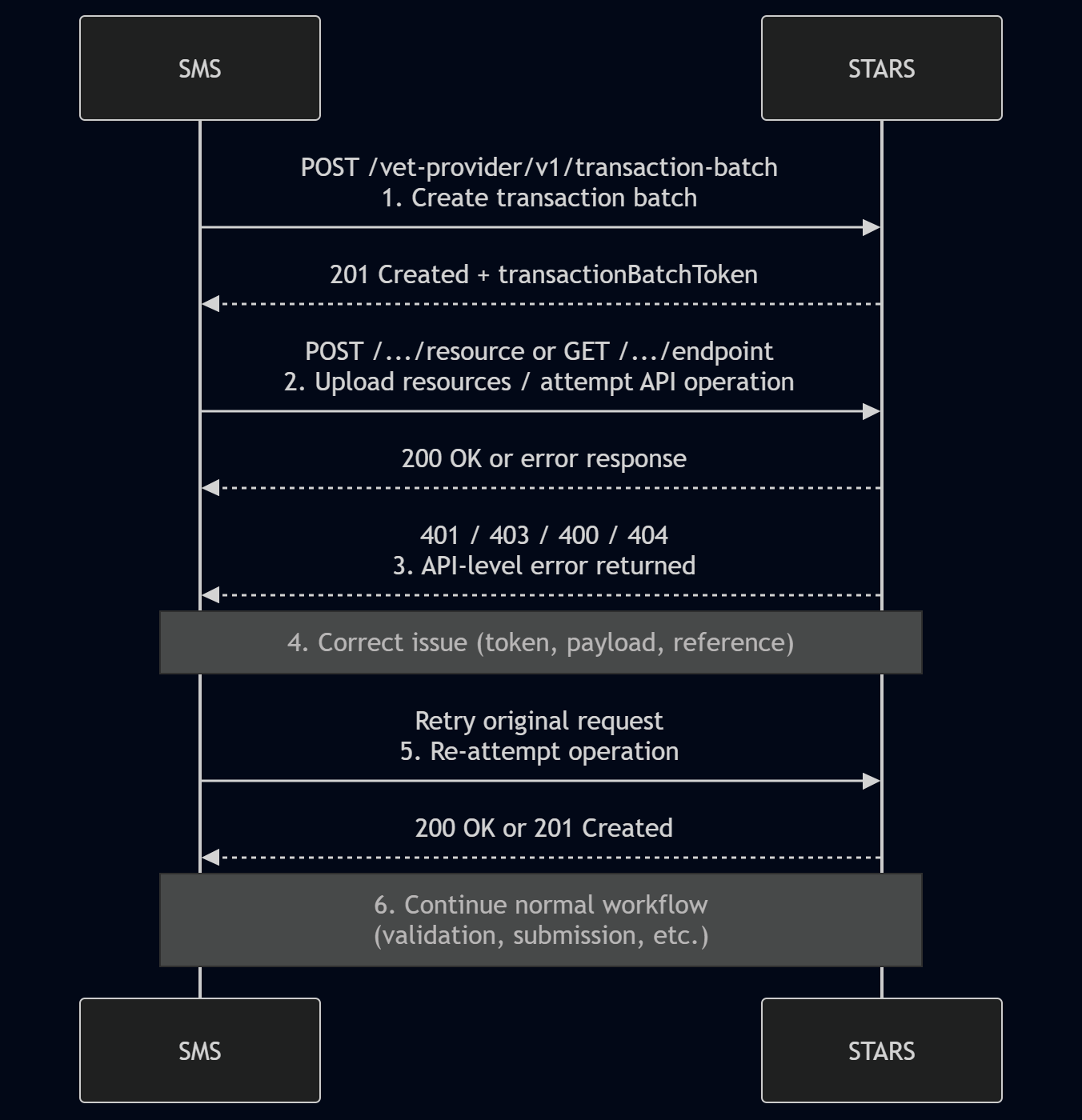
Step‑by‑step flow
Step 1: Create transaction batch
SMS action:
POST /vet-provider/v1/{jurisdiction}/transaction-batchSTARS response:
201 Created with transactionBatchToken
Step 2: Attempt API operation
The SMS attempts a normal API operation within the transaction batch (for example, uploading a resource or retrieving batch information).
SMS action:
POST /.../resource or GET /.../endpoint
This step represents standard interaction with the STARS APIs and is not specific to error handling.
Step 3: API‑level error is returned
STARS returns an API‑level error response to the SMS.
Common examples include:
401 / 403 – authentication or authorisation failures (for example, expired or invalid token)
400 – malformed or structurally invalid request payload
404 – referenced transaction batch or resource not found
These errors are returned before any data is persisted and do not represent business‑rule validation failures.
Step 4: Correct the issue
The SMS corrects the cause of the API‑level failure, based on the error response returned by STARS.
Examples include:
Refreshing or obtaining a new access token
Correcting the request payload structure or values
Correcting the referenced resource UID or transaction batch token
No data has been stored in STARS at this point.
Step 5: Retry the original request
SMS action:
Retry the original API request using the corrected credentials, payload, or referenceSTARS response:
Successful response (200 OK or 201 Created)
Because API‑level errors occur before persistence, it is safe to retry the request after correction using the same transaction batch.
Step 6: Continue with the normal workflow
Once the API‑level issue is resolved, the SMS proceeds with the standard workflow.
End state
The SMS has successfully retried the original request, after correcting the issue, and can continue using the same transaction batch to complete validation and submission as normal.