Scenario - Defer a program enrolment
Note: jurisdiction has now been added to transaction batch route.
This scenario explains how a student management system (SMS) defers a program enrolment by updating the program enrolment lifecycle state to Deferred.
It demonstrates how to apply a lifecycle change by re‑uploading program enrolment resources using the previously submitted resource unique identifiers (UIDs).
Each upload must include the complete top-level resource and all current child objects. For example the deferred program enrolment lifecycle state cannot be uploaded on it's own.
Key points:
explains the process to defer a program enrolment
reuse the previous submitted resource identifier
ensure any associate subject enrolments have a valid lifecycle states
highlights the recommended integration pattern used for validation
request asynchronous validation only when data entry is complete
correct any identified issues before re‑validating and submitting the transaction batch
Note: a subject enrolment cannot be deferred
Sequence overview
An SMS creates a transaction batch, updates the program enrolment lifecycle state to Deferred, ensures subject enrolments remain in valid lifecycle states, completes validation, and submits the transaction batch once no blocking validation failures remain.
Sequence diagram
Note: Security and authentication flows are not shown.
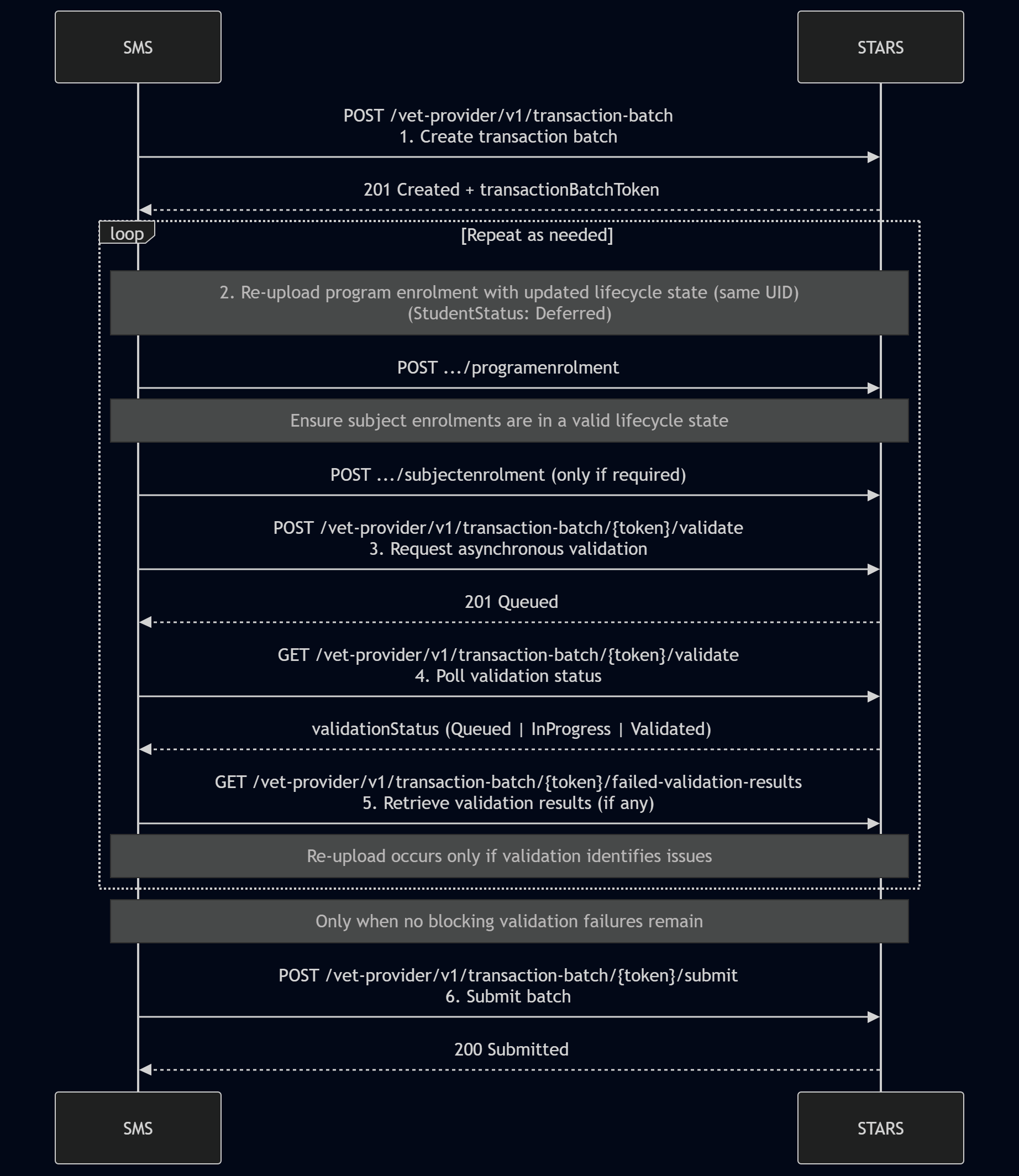
Step‑by‑step flow
Step 1: Create (or re‑use) transaction batch
Create a new transaction batch or re‑use an existing transaction batch with a status of NotSubmitted.
SMS action:
POST /vet-provider/v1/{jurisdiction}/transaction-batchSTARS response:
201 Created with transactionBatchToken
Step 2: Upload program enrolment to be deferred
The SMS re‑uploads the program enrolment being deferred using the same resource UID that was previously submitted.
Each upload must include the complete top-level resource and all current child objects. Additionally the deferred program enrolment contains
studentStatus: Deferred
studentActivityDate: YYYY‑MM‑DD
studentStatusReason: a valid deferral reason (for example, Deferral_Pre or Deferral_Post)
changeTrackingIdentifier
Each subject enrolment with a deferred parent program enrolment must not have it's latest lifecycle state of commenced. Top-level resources that have not changed shouldn't be uploaded.
Where available, the previously returned changeTrackingIdentifier should be supplied to identify the version being updated.
Step 3: Request asynchronous validation
SMS action:
POST /vet-provider/v1/{jurisdiction}/transaction-batch/{token}/validateSTARS response:
201 Created (validation queued)
Step 4: Poll for validation readiness
SMS action:
GET /vet-provider/v1/{jurisdiction}/transaction-batch/{token}/validateSTARS response:
Current validation status
The SMS continues polling until validation processing is complete.
Step 5: Retrieve validation results (if any)
SMS action:
GET /vet-provider/v1/{jurisdiction}/transaction-batch/{token}/failed-validation-results
(pagination supported)STARS response:
Any blocking or non‑blocking validation results
If blocking validation failures are returned:
review the failed validation results
correct the data as required
repeat Steps 2–6 until no blocking validation failures remain
Step 6: Submit transaction batch
SMS action:
POST /vet-provider/v1/{jurisdiction}/transaction-batch/{token}/submitSTARS response:
200 OK with status Submitted
End state
The program enrolment has been successfully deferred, and the updated lifecycle state has been submitted to STARS.